Test with players
New in 1.72. Try a multiplayer game with no second person and no second device. Test with players starts 1 to 3 simulated players in this tab. Each one is a complete copy of the app: it joins your session the way a friend would and gets your scene, your logic and your HUD. Watch it in a small view, or take it over and play as it.
Where it is
| Where | How |
|---|---|
| Play button | right-click Play ▸ Test with players… |
| Phone | long-press Play ▸ Test with players… |
Run a test
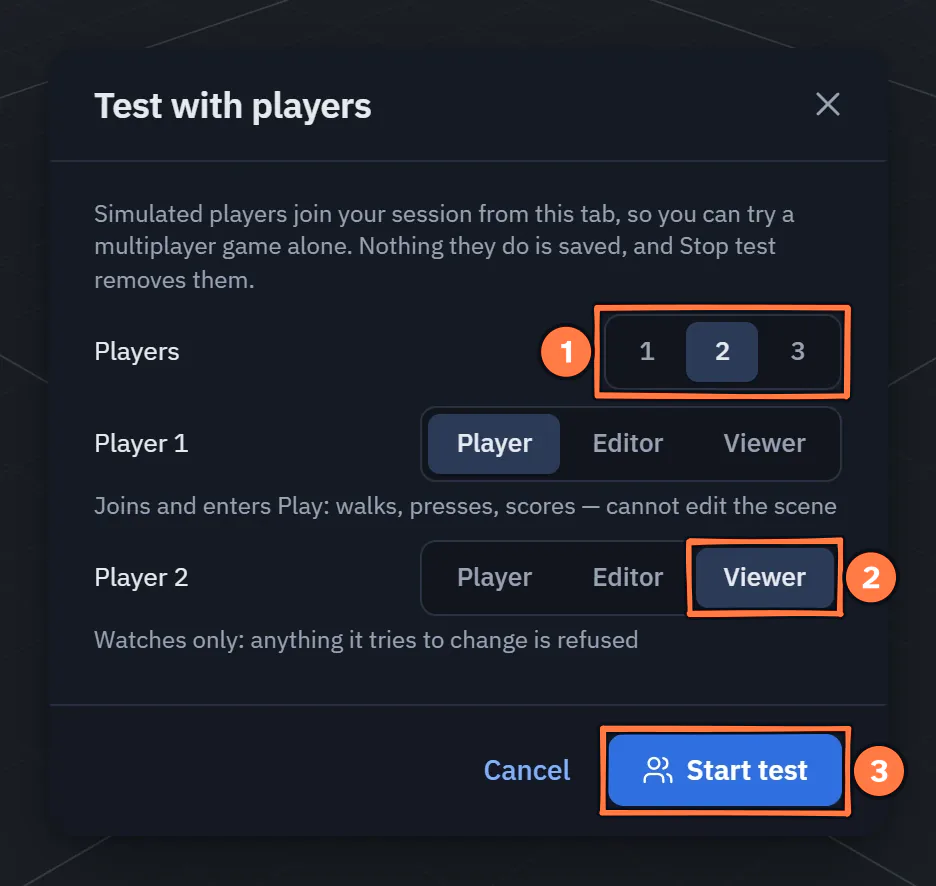
Right-click Play ▸ Test with players… opens this sheet.
- Players: how many simulated players join (up to 3; 1 on a phone or a headset).
- A role for each one: Player, Viewer or Editor.
- Start test adds them to your session.
- Choose how many players (1 to 3; 1 on a phone or a headset) and a role for each one:
- Player: joins and goes straight into Play. It can press, trigger and score. It cannot change the scene.
- Viewer: watches. Everything it tries to change is refused, exactly as for a real view-only guest.
- Editor: may do anything a guest editor may.
- Press Start test. A strip at the bottom shows each player's view and its state: loading, joining, joined or playing. The players start one after another, so the second one appears a few seconds after the first. A player that cannot start is tried once more and then shows Did not start.
- Press the gamepad button on a view to Drive it. The view gets bigger and takes your keyboard, so the keys you press are that player's keys. Press it again to hand the keyboard back.
- Stop test (on the strip, or right-click Play ▸ Stop test) removes them all. Nothing stays behind: no rows in People, no saves and no settings changes. The simulated players never write to your storage.
Good for
- Checking that a win or lose condition fires for one player and that everyone sees it.
- Checking that a viewer really cannot edit.
- Checking that a HUD reads right for a second player.
- Seeing what a joiner sees when they arrive mid-round.
- Checking that an enemy chases whoever is nearest.
Limits
- A test runs in a session of your own. If other people are connected, leave the session first.
- The simulated players make no sound and do not use a headset view.
- Each one is a whole app: about 35 MB of script memory, measured on a computer, plus its own 3D view. On a slower computer, 3 players can make the editor slower while the test runs.
- On a headset you can enter and leave VR while a test runs; the players stay joined.