Possess Object
Puts the player in control of an object when a pulse arrives: a vehicle, a turret, a ball. A second input hands it back.
Output: effect (optionally wire into an Object Selector to pick the object)
Inputs
| Handle | Type | Meaning |
|---|---|---|
| trigger | event | take control of the target |
| release | event | hand it back |
| target | object | the object to drive, from an Object Selector |
| speed, turnSpeed, eyeHeight | number | override the card sliders when wired |
The object is found in this order: the target input, then an Object Selector the node's output is wired into, then the owner of the object flow the node sits in.
Parameters
| Parameter | Default | Options |
|---|---|---|
| camera | chase | chase, orbit, first, none |
| speed | 4 | 0.1 – 30 m/s driving forward or back |
| turnSpeed | 2.5 | 0.1 – 10: how fast it turns, in radians per second |
| eyeHeight | 1.7 | 0.2 – 3 m above the object: the eye for the first camera |
| mouseLook | off | first camera only: the mouse turns the object and tilts the view |
| camera | What the view does |
|---|---|
| chase | sits behind and above the object, eases after it and looks at it |
| orbit | keeps orbiting around the object as it moves; drag and zoom as usual |
| first | looks out from the object, eyeHeight above it, facing where it faces |
| none | stays where it is |
Driving
While you hold an object, the keys drive it instead of you. The controls are tank-style: W / S (or ↑ / ↓) drive forward and back along the way it faces, and A / D (or ← / →) turn it. In VR the left stick does the same. Your own movement pauses until you let go.
You let go when the release input pulses, or when you press Esc. With mouseLook on, leaving the pointer lock also lets go. Entering VR lets go too. If trigger and release pulse in the same moment, the release wins. A new trigger while you already hold something lets go of it first.
Things worth knowing:
- Holding an object selects it, so other players see the usual lock highlight and can't grab it. If another player already has it, a message says who.
- If the object can't be found, a message says there is nothing to possess.
- The object's movement is sent to the other players about ten times a second. A physics object follows your driving during a running simulation and becomes physical again when you let go.
- An animation on the object pauses during the ride and carries on from where you left it.
- Letting go records the whole ride as one undo step.
- mouseLook needs a click in the page first. Without one, a message says so and you steer with A / D instead.
The trigger is shared like every pulse, so in a multiplayer session each player's copy of the graph reacts to it, and the player who locks the object first ends up holding it. Possess Object is simplest in single-player games, or with a trigger only one player can reach.
Practical example
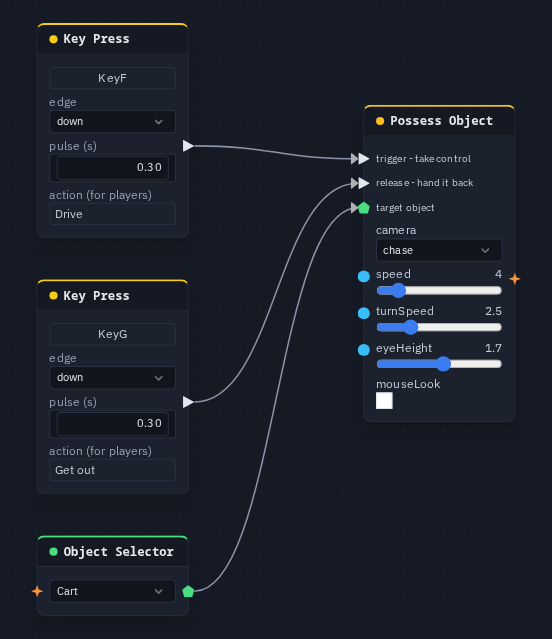
Drive a box with F and let go with G:
- Create a box and name it Cart.
- Add an Object Selector that picks Cart, and a Possess Object. Wire the selector into Possess Object's target.
- Add a Key Press on F and wire it into trigger. Add a Key Press on G and wire it into release.
- Press F: the view moves behind the cart and WASD drive it. Press G to hand it back.
Tip
To have the camera follow something that moves by itself, such as a physics car, an animation or another player, use Camera Follow instead. It moves the view without taking the controls.