Game Time
The round clock: seconds since the round started, the same on every player's screen. It stops while the game is paused. It can also read the time left, the round number, or whether the game is playing.
Output: number (shown live on the card)
Parameters
| Parameter | Default | Options |
|---|---|---|
| read | elapsed | elapsed (seconds into the round), remaining (length − elapsed, never below 0), round (how many rounds have started), playing (1 while the state is playing, else 0) |
| length | 60 | 1–3600 s — the round length remaining counts down from |
Set length with the slider on the card; remaining is the only reading that uses it.
How the clock works
Game Time has no clock of its own. It is worked out from the moment the round started, which is part of the shared game state, so two players mid-round read the same time, and a player who joins later reads the right time as soon as they arrive.
- A new round (
playingentered frommenuorover, see Set Game State) starts it from 0 and adds 1 toround. pausedfreezes it, and resuming carries on with no jump: paused time never counts.overandmenudo not stop it —elapsedkeeps rising until the next round starts. A full reset on Set Game State zeroes it; the round count is kept.- Before any round has started it reads 0.
Practical example
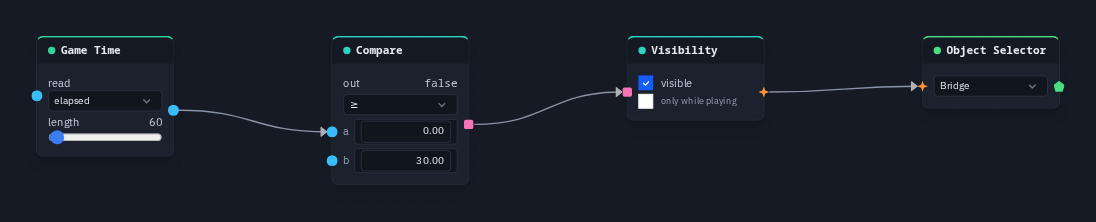
A bridge that appears 30 seconds into the round:
- Add a Game Time (read
elapsed). - Add a Compare (op
gte, b = 30); wire Game Time → its a. - Add a Visibility node; wire Compare → its on.
- Add an Object Selector picking the
Bridge; wire Visibility → Object Selector. Start the game: the bridge shows up for everyone at the same moment, and is hidden again when the next round starts.
Tip
Actions ▸ Show the round time in the HUD editor wires a Game Time (remaining, 60 s)
into a HUD Text for you. For a time limit that actually ends the round, use Kit: Round
from the game kit.