Latch
Holds a boolean until told otherwise — set, reset and toggle pulses make it a memory bit. Every trigger in the graph is a short pulse; a Latch is how a pulse becomes something that stays: a door that stays open, a gem that stays collected, a light that stays on.
Output: boolean (true after a set, false after a reset)
Inputs
| Handle | Type | Meaning |
|---|---|---|
| set | event | a pulse turns it on (true) |
| reset | event | a pulse turns it off (false) |
| toggle | event | a pulse flips it |
Parameters
| Parameter | Default | Options |
|---|---|---|
| initial | off | what it reads before anything has set or reset it (toggles flip from this value) |
| reset each round | off | forget every set, reset and toggle from earlier rounds — see below |
How it decides
- Set and reset: the most recent one wins. The Latch compares when its last set and its last reset arrived. If both arrive at the same instant it reads as set.
- Toggle flips whatever set/reset says. A set or reset starts the flipping over, so
setafter any number of toggles always reads true.
The pulses come from the shared trigger log every player already has, so all players read the same value with nothing extra sent. A player who joins later is caught up on that log: set and reset are exact for them. Toggle is the one part that can be off — the number of flips is copied from another player rather than worked out — until the next set or reset puts everyone back in step. Prefer set / reset in a multiplayer game when it matters.
Reset each round
With reset each round on, a set, reset or toggle from an earlier round counts as never having happened, so the Latch falls back to initial when a new round starts — and also while the game is on its menu or the round is over. That is how a collected gem comes back next round with no reset wire to draw and nothing to send.
It only takes effect once the scene's game has been started at least once (see Build a game); in a scene without a game the Latch behaves as if the option were off. Off is the default, so a Latch in a graph without a game never changes because somebody pressed Start.
Practical example
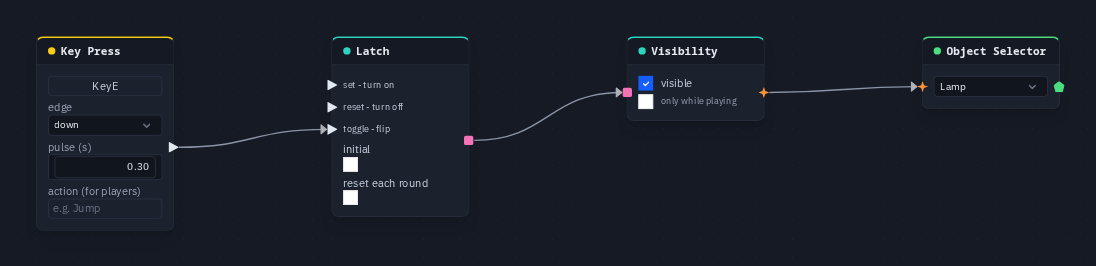
A lamp you switch with a key:
- Add a Key Press (capture E) and a Latch; wire Key Press → Latch's toggle.
- Add a Visibility node; wire Latch → its on.
- Add an Object Selector picking the lamp; wire Visibility → Object Selector.
- Press Play and tap E: the lamp appears, tap again and it is gone — for every player.
Tip
For "hide it once it is picked up", wire the pickup's pulse into reset with initial on, and turn on reset each round so the pickup returns every round. A Store Value keeps a result after the round ends — a round-scoped Latch reads initial again the moment the round is over.