Player Variable
Reads a number kept per player — laps, touches, a personal score. Each player reads their own, or you can read one named player's, the team total, or the highest.
Output: number (shown live on the card)
Parameters
| Parameter | Default | Options |
|---|---|---|
| name | laps |
the per-player variable to read, up to 40 characters |
| read | mine | mine (this player's own number), sum (everyone's added up), max (the highest anyone holds), peer (one player's, named below) |
| peer | (empty) | a player's peer id — used only when read is peer |
A player who has not written the name yet counts as 0, and max reads 0 when nobody has it.
Where the numbers come from
Each player's numbers are written by a Set Variable with scope player,
and only that player can change them. Every player holds a copy of everybody's numbers, so sum,
max and peer read the same everywhere, while mine is different on every screen. That is the
point of it: it is the number a player's own HUD shows.
- A player who joins later receives everyone's numbers as they connect.
- A player's numbers survive leaving Play and travelling to another scene. When a player disconnects, the others drop their numbers, so the totals no longer include them.
- Nothing resets them for a new round, and they are not saved with the scene.
This is a different store from Get Variable, which reads the one shared number of that name. A Leaderboard lists every player's number in a HUD list.
Practical example
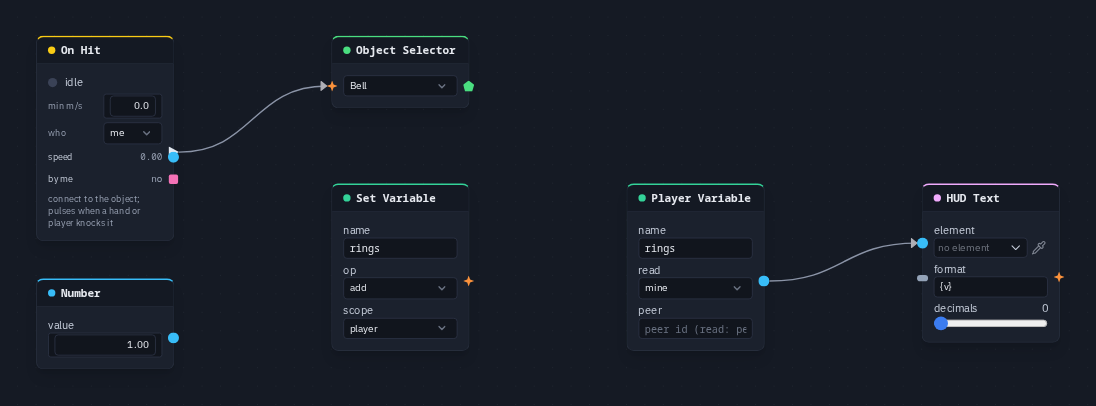
Count each player's own bell rings on their own HUD:
- Add an On Hit (who
me) and an Object Selector picking theBell; wire On Hit → Object Selector. The bell needs a dynamic body and the scene's Knock on — see On Hit. - Add a Set Variable (name
rings, opadd, scopeplayer); wire On Hit → its trigger, and a Number (value 1) → its value. - Add a Player Variable (name
rings, readmine) and wire it into a HUD Text's value. - Each player's HUD counts only the rings they made. Switch the Player Variable to
sumto show the team's total instead.
Known problem in 1.42
Step 2 cannot be wired by hand yet: the Set Variable card does not draw its trigger and value sockets (see Set Variable). The Player Variable half of the example works as shown.