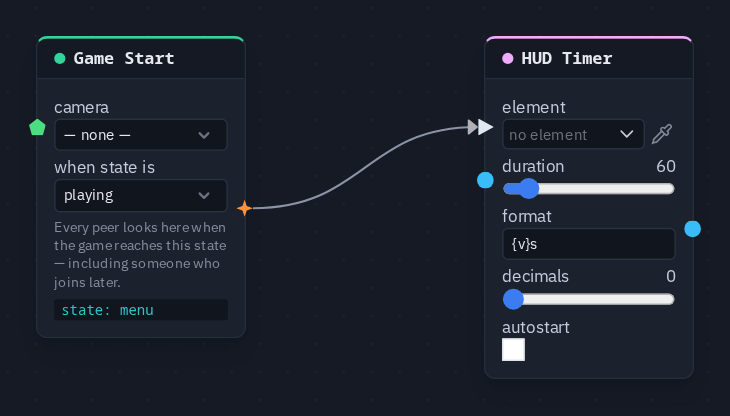
HUD Timer
Runs a countdown in a HUD Timer element from its duration, formatted like {v}s — it starts by itself or on a pulse.
Output: number (the seconds left)
Inputs
| Handle | Type | Meaning |
|---|---|---|
| start | event | a pulse starts (or restarts) the countdown from the full duration |
| duration | number | the length in seconds — wired, it replaces the card's duration |
Parameters
| Parameter | Default | Options |
|---|---|---|
| element | (none) | the Timer element to write into — see below |
| duration | 60 | 1–600 seconds |
| format | {v} |
{v} is replaced by the seconds left, so {v}s reads 42s |
| decimals | 0 | 0–2 digits after the point |
| autostart | on | count down with no pulse; off, the timer holds at the full duration until a pulse arrives on start |
The countdown is worked out from the shared time stamp of the pulse that started it, so every player reads the same time left with nothing extra sent, and it stops at 0. The output is the same number, so a Compare on it can end the round when it reaches 0.
Picking the element
The Timer element is made, placed and styled in the HUD editor; the duration on the element is only a preview, this node owns the real one. On the card, element opens the scene HUD's elements grouped by screen; the pipette button lets you click the element on the HUD editor's stage instead, and Enter id manually... takes a typed id. A name that matches no element shows amber.
Known problem in 1.42
A pulse wired into start is not picked up yet. A timer with autostart off therefore stays at its full
duration, and one with autostart on reads 0. Until that is fixed, show a round clock with a
Game Time node (read remaining, length 60) wired into the value of a HUD Text
that points at the same Timer element — HUD Text takes the same {v}s format.
Practical example
A one-minute round clock, as the node is meant to be used:
- In the HUD editor, add a Timer element to the playing screen.
- Add a Game Start and a HUD Timer picking the Timer element; wire Game Start → HUD Timer's start.
- Set duration 60, format
{v}s, and turn autostart off. - Every round, the clock counts down from 60s on every player's screen.