Make an enemy
New in 1.72. Any object can be an enemy: a guard that walks its round, notices you, chases you round the walls, attacks when it reaches you and gives up when it loses you. It needs the Navigation module, which installs the first time you use it.
Make one
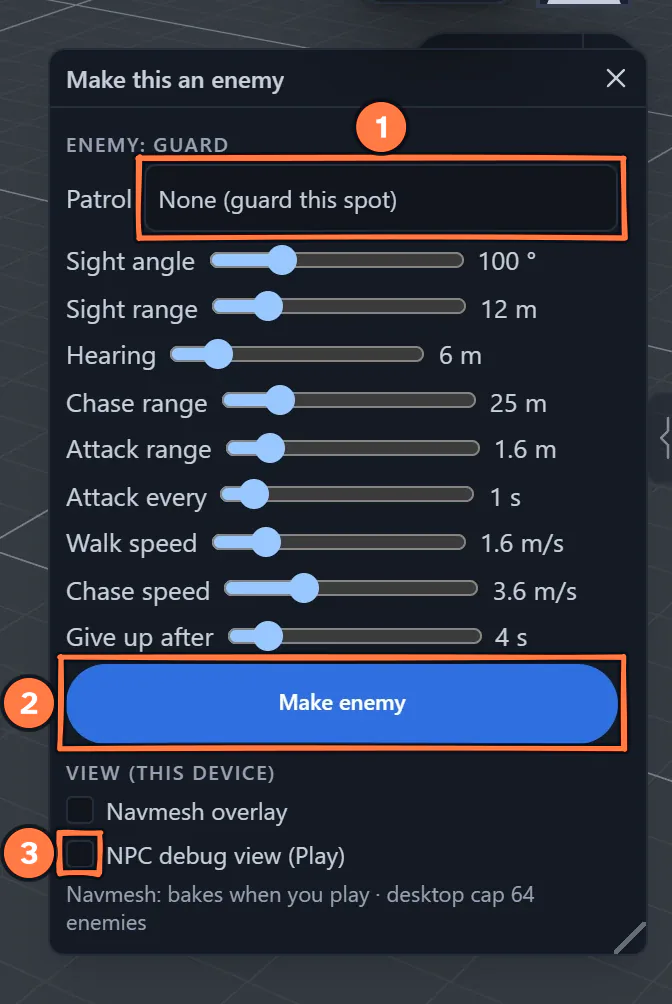
Right-click an object ▸ Make this an enemy… opens this sheet.
- Patrol: guard this spot, an existing Path, or a new loop around it.
- Make enemy sets it up (one undo step).
- Navmesh overlay and NPC debug view (Play), on your screen only.
- Right-click the object ▸ Make this an enemy… (it is also in the empty-space menu's Selected ▸). The first time, the Navigation module installs from the gallery.
- Set it up in the sheet:
- Patrol: None (it guards this spot, facing the way you left it), an existing Path, or New loop around it (a square Path you can then edit).
- Sight angle and Sight range: its view cone. Walls block it.
- Hearing: how far a normal noise carries to it.
- Chase range, Attack range and Attack every.
- Walk speed, Chase speed and Give up after.
- View (this device): Navmesh overlay and NPC debug view (Play).
- Press Make enemy. Press Play to try it.
Update enemy changes it later and Not an enemy makes it an ordinary object again. Each is one undo step (with New loop around it: two, the Path and then the enemy).
What it does in Play
| State | What you see |
|---|---|
| Patrol / guard | It walks its Path, or stands at its spot facing the way you left it. |
| Alert | It heard a noise: it turns, walks to where the noise was and looks around. |
| Chase | It saw you inside its cone: it runs after you, round walls. |
| Attack | It reached you on the same level: it attacks every few seconds. |
| Lost / give up | It has not seen or heard you for Give up after seconds. |
| Return | It walks back to its round. |
Make it do something
The enemy fires events; wire them to what your game needs with On NPC Event:
spotted▸ an Announce "Spotted!" and a whistle.attack▸ take a life, or send the player back to a checkpoint.gaveup▸ an Announce "It lost you".
The A guard on patrol template has the first and the last wired up.
Tips
- Give the guard a short, closed Path round something it can hide behind, so the player has a reason to sneak.
- Crates you can push block it; pushing one out of a doorway frees the way.
- View ▸ NPC debug view shows each enemy's path and state while you play; nobody else sees it, and it is never in an exported game.
- An enemy in a headset session hunts the person in the headset too.
- Use Test with players to check it chases whoever is nearest.