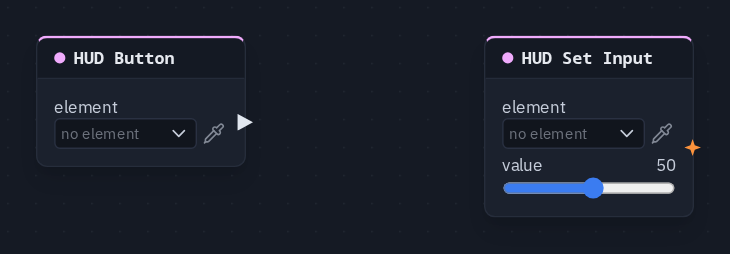
HUD Set Input
Writes a value into a HUD input element when a pulse arrives — to prefill, clear or correct it: a Reset button that puts the volume back, a difficulty the host sets.
Output: none (it writes into its element)
Inputs
| Handle | Type | Meaning |
|---|---|---|
| trigger | event | each pulse writes the value once |
| value | number | the value to write — wired, it replaces the card's value; text works too, for a text field |
| options | number | a comma-separated list (Easy, Normal, Hard) that replaces a dropdown's own options while it is wired |
Parameters
| Parameter | Default | Options |
|---|---|---|
| element | (none) | the Slider, Toggle, Dropdown, Text field or Tabs to write into — see below |
| value | 0 | −1000 to 1000 |
Known problem in 1.42
The card does not draw its trigger, value and options sockets yet, so this node cannot be wired in the node editor.
How the write behaves
- Once per pulse, never every frame — so it never fights the player's own hand on the control.
- As if the player had set it. A HUD Input reading the control sees the new value, and the element's shared switch decides whether it travels: shared, everyone gets the value; not shared, it stays on each machine.
- The pulse decides who. The node runs on every player's machine when its pulse arrives, and a HUD Button press or a Key Press is a shared pulse — so a Reset button resets the control on every player's screen, even a control that is not shared.
- Late joiners are not re-sent a press from before they arrived; a shared control's current value reaches them on its own.
- The pulse also pokes the element: aimed at a Damage flash, it makes the screen flash.
Live dropdown options
With something wired into options, the dropdown offers that list instead of the options typed in the HUD editor,
and it follows the list as it changes — no pulse needed. A HUD Input reading index counts in the live list. Delete
the node and the typed options come back.
Picking the element
The control is made, placed and styled in the HUD editor. On the card, element opens the scene HUD's elements grouped by screen; the pipette button lets you click the element on the HUD editor's stage instead, and Enter id manually... takes a typed id. A name that matches no element shows amber.
Practical example
A Reset button for a volume slider:
- In the HUD editor, add a Slider (start value 50) and a Button labelled Reset.
- Add a HUD Button picking the button, and a HUD Set Input picking the slider, value 50.
- Wire HUD Button → HUD Set Input's trigger.
- Drag the slider, then press Reset: it jumps back to 50.