Leaderboard
Ranks the players by their own per-player variable (laps, score) into a HUD List element, highest or lowest first, top N rows.
Output: none (it writes rows into its element)
Inputs
None — it reads the players and their numbers by itself.
Parameters
| Parameter | Default | Options |
|---|---|---|
| element | (none) | the List element to fill — see below |
| variable | laps |
the name of the per-player variable to rank by |
| order | desc | desc (highest first — a score), asc (lowest first — a best time) |
| format | {name} — {v} |
how each row reads: {name} is the player's name, {v} their number, {rank} their place ({rank}. {name} {v}) |
| decimals | 0 | 0–3 digits after the point for {v} |
| limit | 10 | 1–20 — the most rows it writes |
Where the numbers come from
Each player has their own copy of a per-player variable — written by a Set Variable with scope
player, or by a collectible whose scope is player (see Build a Game Loop). Read one player's
number with a Player Variable.
The pulse decides who scores. A Set Variable runs on every player's machine when its pulse arrives, so a shared
pulse — a HUD Button press, a Key Press — adds to every player's own number at once. A pulse only one machine
sees counts for that player alone: an On Hit with who set to me, or a player-scoped collectible.
- One row per player in the room, named by their player name. A player who has not scored yet is listed with 0 rather than left out; a player who disconnects drops off.
- Same order on every screen. Players on the same number are always listed in the same order.
- Nothing is sent. Every player's machine builds the same list from numbers it already has, and keeps it up to date all the time — so it is right for a player who joins mid-game, unlike rows appended with HUD Rows.
- Nothing resets by itself. Per-player numbers carry over between rounds. To start each round from 0, wire an
On Game State (
playing) into a Set Variable (scopeplayer, opset, value 0).
Picking the element
The List element is made, placed and styled in the HUD editor. On the card, element opens the scene HUD's elements grouped by screen; the pipette button lets you click the element on the HUD editor's stage instead, and Enter id manually... takes a typed id. A name that matches no element shows amber.
Quicker: select the List element in the HUD editor and choose Actions ▸ Show a leaderboard — it adds this node
already pointing at the list, ranking laps.
How many rows show is also up to the list: the element's max rows (5 unless you change it), or the rows of a HUD List node naming the same element. Raise it if limit is higher.
Practical example
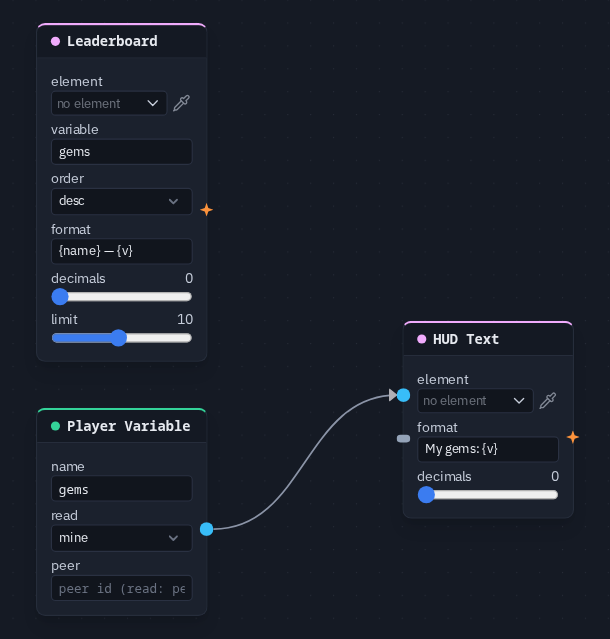
A race to collect gems:
- Make a few objects collectible with scope
player, counting intogems— see Build a Game Loop (it uses the Collectibles module). Each pickup now counts for whoever made it. - In the HUD editor, add a List element, select it and choose Actions ▸ Show a leaderboard. On the Leaderboard
card, set variable to
gems. - For each player's own count, add a Player Variable (
gems, readmine) wired into a HUD Text's value, formatMy gems: {v}. - Press Play with friends: the list ranks everyone by their gems, and each player sees their own count.
Tip
For a race, rank lap times with order asc and decimals 2, so the fastest time sits on top.