Tools & connections
Settings ▸ Tools & connections is one page for everything outside the app: the AI models you use, the services that generate 3D models, the agents in your session and the desktop tools you edit in. Set up only the ones you use. It used to be Settings ▸ AI, and your saved providers and keys carried over as they were.
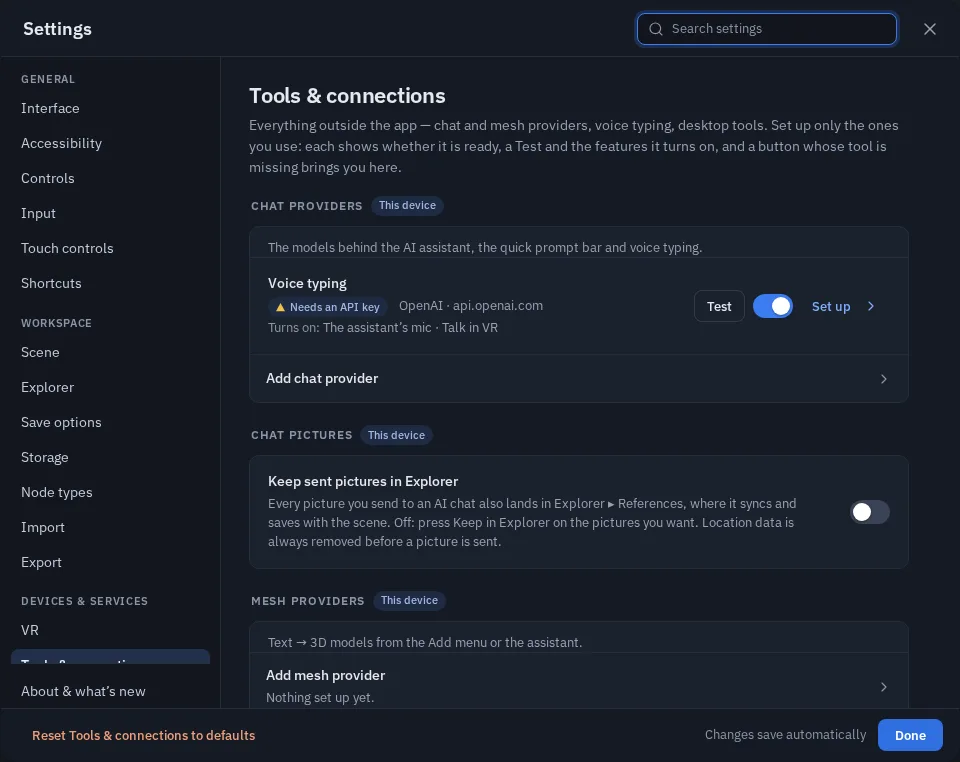
A row
Each tool is one row:
- A status in words, with a coloured dot: green is ready to use, grey is switched off or not connected, amber needs setting up, and red means the last Test failed.
- Test asks the tool whether it answers right now. It costs nothing and generates nothing (see below).
- Enable / Disable switches it. Nothing is deleted: the provider and its key stay, ready for later.
- Turns on lists the features the tool gives you, such as Generate 3D model or the assistant's mic.
- Set up opens its form. Guide opens its docs page, where it has one.
The sections
| Section | What it holds | What Test does |
|---|---|---|
| Chat providers | The models behind the AI assistant and the quick prompt bar, and voice typing. See AI Providers | Lists the provider's models and checks yours answers. Voice typing sends half a second of silence |
| Chat pictures | How pictures you attach to a chat are sized and kept. See Talk to your agent | — |
| Mesh providers | Text to 3D models from the Add menu, the assistant and agents. See 3D Generation | ComfyUI: asks for its status. Meshy: lists your tasks, so it uses no credits |
| Animation providers, theprototype AI box | Not available yet: a later update adds rigging and animation services and your own GPU box here | — |
| Agents | Coding agents in this session, with Set up making an invite link and the MCP command to paste. See Build with an AI agent. On theprototype.app, also Connect Claude | Says who is connected |
| Desktop tools | Blender and any other tool that opens and saves glTF. Nothing to install. See Edit in Blender | Says whether this browser can also watch a saved file |
When a tool is missing
Buttons for a feature whose tool is not set up stay where they are. Press one and it says what is missing, then opens the right row: "Generate 3D model needs a Mesh provider: set one up in Settings ▸ Tools & connections." The quick prompt bar, the mic and Edit in Blender work the same way.
The AI button is different: it always opens the Chat window on its Assistant tab, which offers Connect Claude or your own provider.
The assistant reads the same status. Ask it for something this device has not set up and it tells you what is needed
instead of guessing. Agents see the same through status().missingTools.
Where this lives
Everything on this page stays on this device: it is not sent to other people in the session or saved in a scene. API keys are stored unencrypted in this browser and only ever sent to the provider you set up.