Starter recipes
New in 1.64. A recipe turns the selected object into something that works when you press Play, in one click, built only from ordinary nodes you can open, read and change afterwards.
Where they are
Select the object, open the node editor on its flow, then right-click the pane (or open the node search) ▸ Recipes:
| Recipe | What you get |
|---|---|
| Door (click to open) | On Click opens and closes it: a quarter turn, shared and saved |
| Door (opens when you walk up) | a sensor zone around the door: walking in opens it, walking out closes it |
| Bell | click, point at or knock it: it swings and rings for everyone |
| Guard | walks a loop path around where it stands; says "Spotted!" when a player steps into its sight |
The entries are greyed out on the Main graph: a recipe goes into an object's own flow, so select the object first. A toast confirms what was added — Added the door recipe — press Play to try it.
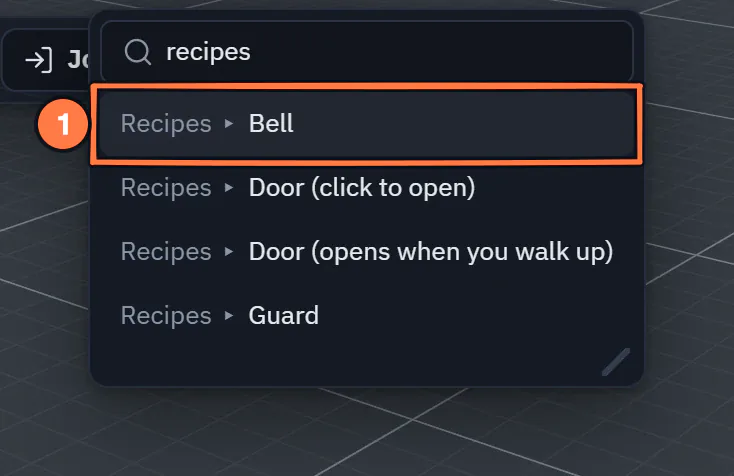
The node search on a selected object, searched for "recipes".
- A Recipes row: pick it to put the whole recipe in the selected object's flow.
To see all four at work first, open Templates ▸ Doors, a bell and a guard: a yard with a door you click, a gate that opens when you walk up, a bell and a guard on its round. Press Play and try them, then open each object's flow to see what its recipe made.
What a recipe does
- The nodes go into the selected object's own flow (a flow is made if it has none), below whatever it already holds.
- Anything else the recipe needs — the walk-up door's sensor zone, the guard's Path — is added to the scene beside the object.
- Everything it makes is one undo step: Ctrl+Z takes the nodes and the extra objects away together.
- It is shared like any other edit: everyone in the session sees the nodes and the objects at once, and the result works the same for all of them.
- The selection stays on your object.
Nothing about a recipe is special afterwards: the nodes are normal nodes. Change a sound, a speed or a radius on their cards, or delete what you do not want.
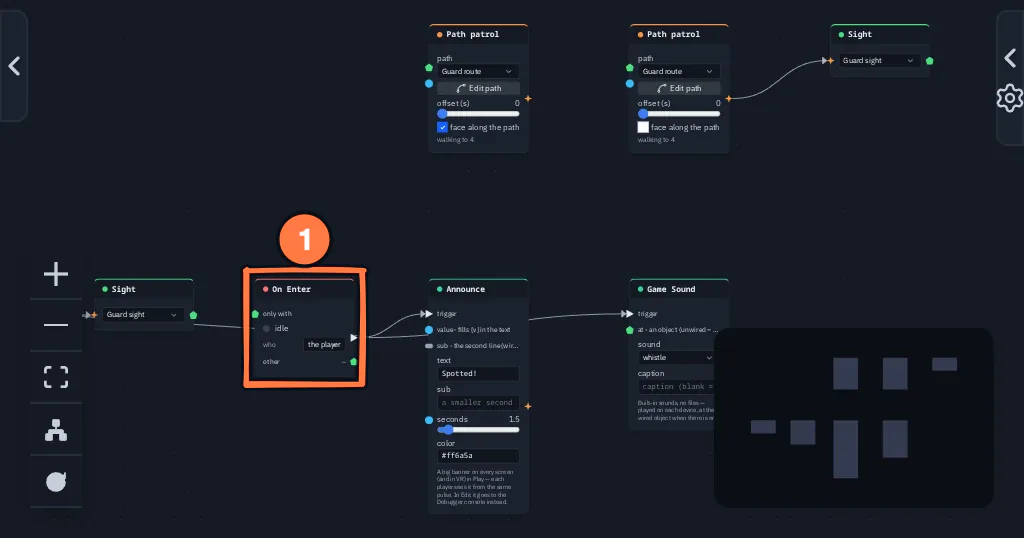
What the Guard recipe puts in the guard's flow.
- On Enter fires when a player steps into the guard's sight; Announce and the whistle follow.
More recipes made by hand: a furnished room and a gem arena.