Checkpoints
A checkpoint is a copy of the scene as it is right now — objects, node graphs, HUD, sky, physics, the camera — kept on this device, with a name, an optional note, a picture and a time. Autosave only remembers the last state; checkpoints let you go back to any earlier one.
Saving a checkpoint
Menu (the logo button) ▸ Save checkpoint…, or press Ctrl+Shift+S. Type a name and, if you like, a note ("before lighting", "try the red version next"), then press Save checkpoint.
The timeline
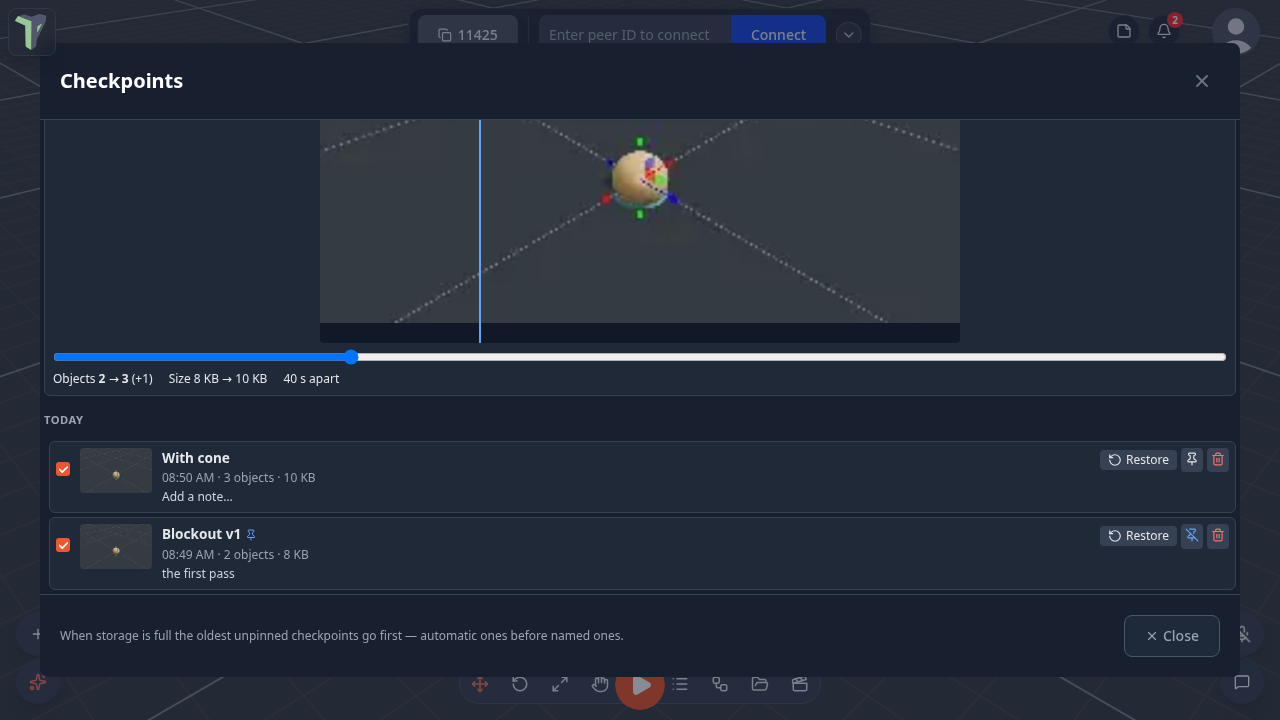
Menu ▸ Checkpoints lists every checkpoint, newest first, grouped by day. In it you can:
| Action | How |
|---|---|
| Restore | replaces the open scene with the checkpoint. The scene you leave is kept in the timeline as "Before restoring …", so a restore can itself be undone. With people connected, they are asked to accept first (the same as opening a saved session) |
| Rename | double-click the name |
| Note | click the note line to edit it (Ctrl+Enter saves) |
| Pin | a pinned checkpoint is never removed to make room |
| Delete | removes the checkpoint |
| Compare | press Compare, then tick two checkpoints: their pictures sit on top of each other with a swipe slider, plus what changed (object count, size, time apart, "same content"). Tick just one to compare it with the scene as it is now |
Two filters narrow the list: show only This scene's checkpoints, or hide the Automatic ones.
Automatic checkpoints
While you work, autosave also adds an automatic checkpoint every few minutes — only when the scene actually changed since the last one, and never while a scene is loading or a simulation is running.
In the Checkpoints window the Automatic switch shows or hides the automatic checkpoints in the timeline.
Settings
Settings ▸ Scene ▸ Checkpoints:
| Setting | Default | What it does |
|---|---|---|
| Keep automatic checkpoints | on | autosave adds rows to the timeline |
| Automatic checkpoint every | 10 min | 5 / 10 / 30 / 60 min — the shortest gap between two |
| Checkpoint storage | 250 MB | 100 MB / 250 MB / 500 MB / 1 GB that this device may use |
Limits
- Checkpoints stay on this device (this browser). They are not shared with other people and are not part of a project file — use Save and scene versions (Saving & Sessions) for that.
- When a new checkpoint would not fit, the oldest unpinned ones are removed — automatic ones before named ones. If even that is not enough (everything else is pinned), the save is refused and a message says so. At most 60 checkpoints are kept.
- A scene larger than the storage limit cannot be checkpointed.