Gamepad Axis
A gamepad stick axis as a number between -1 and 1, with a dead zone of its own.
Output: number (the stick's position, from -1 to 1, multiplied by scale)
Inputs
None.
Parameters
| Parameter | Default | Options |
|---|---|---|
| axis | lx | lx, ly, rx, ry (see below) |
| deadzone | 0 | 0 – 0.9: readings this close to the centre count as 0 |
| scale | 1 | -4 – 4: multiplies the reading |
| invert | off | flips the sign |
| Axis | Stick | -1 is | +1 is |
|---|---|---|---|
| lx | left, sideways | left | right |
| ly | left, forward/back | pushed forward | pulled back |
| rx | right, sideways | left | right |
| ry | right, forward/back | pushed forward | pulled back |
Only the two sticks are axes. The triggers (L2, R2) are read as buttons with Gamepad Button.
The card shows the live value, so you can trim the dead zone against a real reading, and no gamepad detected while no pad is connected.
Dead zones
There are two dead zones, applied in order:
- The player's stick deadzone (Settings ▸ Input, 0.05 – 0.4, default 0.15). It hides stick drift at rest, and the rest of the travel is stretched back to the full range. A stick just past the deadzone reads close to 0, not a sudden 0.15.
- This node's deadzone, your game's own threshold. It's a hard cut: anything at or below it reads 0, and anything above it passes through unchanged. With deadzone 0.5 the output stays 0 until the stick is past halfway, then reads 0.5 or more.
The node's deadzone defaults to 0, so only the player's deadzone applies unless you ask for a second one. scale and invert are applied after the dead zones.
Local to each player
A stick is the player's own hardware, so every player's copy of the graph reads their own pad. The output is a different number on each player's machine, and that's by design: it is never sent to the others. The card says so: local to this player, peers do not see this value. To move an object every player sees, let the player drive it with Possess Object, which sends the object's movement to the others.
The output is 0 when the pad is switched off under Settings ▸ Input, unplugged, or while an app dialog is open. The node reads the sticks as they are, so the player's swap sticks and invert Y settings don't apply to it. Reading a stick doesn't take it away from the built-in movement (left stick moves, right stick looks).
Practical example
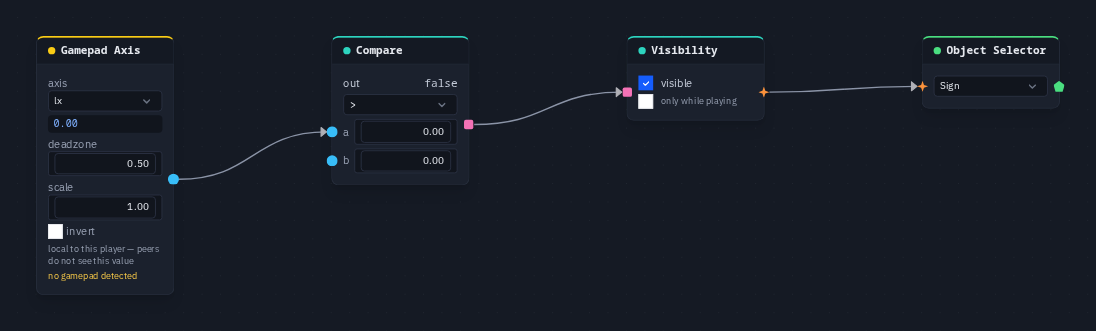
Show a sign while the left stick is pushed hard to the right:
- Create a box and name it Sign.
- Add a Gamepad Axis (axis
lx, deadzone 0.5) and a Compare (opgt, b 0). Wire the axis into Compare's a. - Wire Compare into a Visibility node's on input, and Visibility → an Object Selector that picks Sign.
- Push the stick right past halfway: the sign appears on your screen. Other players see it only when they push their own sticks.
Tip
Pushing a stick forward reads negative on ly and ry. Turn on invert if you want forward to read +1.