Users and moderation
Everyone in your session is listed in the Connected panel (the people button, top right). Each person has a menu: find them, look at their character, mute or hide them for yourself — and, if you run the session, remove them.
New in 1.48
The peer menu, Hide, and Remove / Remove and block with Allow back.
Open the peer menu
- Right-click a person's row,
- long-press it on a touch screen,
- or focus it (Tab) and press the context-menu key or Shift+F10.
- In a headset: radial menu ▸ Tools ▸ People.
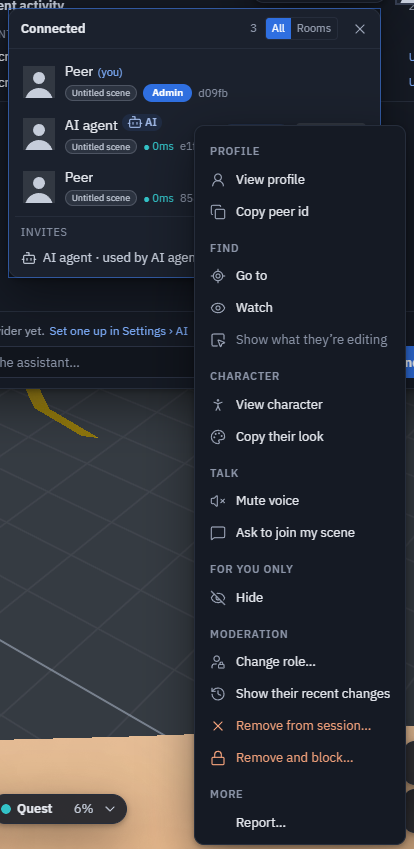
What is in it
| group | entries |
|---|---|
| Profile | View profile — picture, name, peer id, role, device (desktop / phone / VR), app version, connection quality, how they joined (host / invite / approval / guest) and their character on a small turntable · Copy peer id |
| Find | Go to flies your camera to their avatar (in another scene: travels there) · Watch follows their view · Show what they're editing selects (read-only) and frames the object they have selected |
| Character | View character · Copy their look puts on their character and colours (change it back in Change character) |
| Talk | Mute voice (for you) · Request access (someone in a private scene) · Ask to join my scene (rooms on theprototype.app) |
| For you only | Hide — their avatar, node-editor cursor and voice disappear on your screen. They are not told, their edits still arrive, and Show again undoes it. Nothing is saved |
| Moderation | Change role · Show their recent changes (what they did this session, newest first; click a line to select the object) · Remove from session · Remove and block |
An AI agent also shows Revoke invite when it came by one. Your own row has Edit profile, Change character and Copy peer id. On theprototype.app, Report… sits at the end of the menu.
Remove someone
Remove from session takes them out; they can knock again. Remove and block also refuses them for the rest of this session — they see "You were removed from this session". Blocked people are listed in the Connected panel with Allow back.
Who can remove:
| build | who |
|---|---|
| theprototype.app (accounts and roles) | admins |
| the open-source build (no roles) | the session host — whoever the others joined |
A remove sent by anyone else is ignored by everyone.
How it works: a session is a mesh — everyone holds a connection to everyone. Removing someone sends one message; every person's app checks that it came from the host or an admin and closes its own connection to that peer. A modified app that ignores the message is still disconnected by everybody else. Removing someone who came by an invite uses that invite up.
The automatic-join notice's Remove (see Public rooms) keeps someone out of your own door while your tab stays open; the peer menu's Remove and block closes every door in the session.
Limits
- The block list lasts for the session: leaving the session forgets it.
- Hide is per screen and per session.
- "Recent changes" covers what arrived on this device since you joined.