HUD Text
Writes a number into a HUD text element through a format such as Gems: {v} — a score, a count, a readout.
Output: none (it writes into its element)
Inputs
| Handle | Type | Meaning |
|---|---|---|
| value | number | the number to show — wire a Counter, a Get Variable, a Math node |
| format | any | wire text here to replace the whole format — a Behaviour's status line, a Stored Value read as text |
Parameters
| Parameter | Default | Options |
|---|---|---|
| element | (none) | the HUD element to write into — see below |
| format | {v} |
the text to show; {v} is replaced by the number, so Gems: {v} reads Gems: 3. Text without {v} is shown as typed; an empty format shows just the number |
| decimals | 0 | 0–4 digits after the point |
The score display needs nothing else: Counter → HUD Text is a live score, because the Counter already counts the shared pulses.
Picking the element
The node does not draw anything itself. The element — a Text, or anything else that shows a line of text (Rich text, Key hint, Scroll panel, a Timer) — is made, placed and styled in the HUD editor. On the card, element opens the scene HUD's elements grouped by screen; the pipette button lets you click the element on the HUD editor's stage instead, and Enter id manually... takes a typed id. A name that matches no element shows amber.
The quicker route is the other way round: select a Text element in the HUD editor and use Actions — Show a variable, Show a counter or Just show text each build this node already pointing at it.
The text the node writes replaces the element's own label while the game runs; the label typed in the HUD editor is the preview. The card shows what the element is showing right now. Updates reach the screen about ten times a second.
Who sees what
Every player's machine works the text out from the same graph, so a shared source (a Counter, a Get Variable) shows the
same text to everyone, including players who join later. A per-player source — a HUD Input on a local
control, a Player Variable reading mine — shows each player their own number.
Practical example
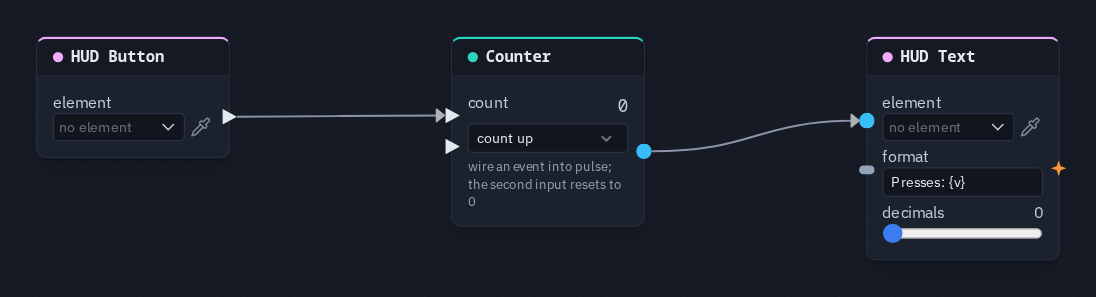
A button that counts its own presses:
- In the HUD editor, add a Button and a Text element.
- Add a HUD Button picking the button, a Counter and a HUD Text picking the text.
- Wire HUD Button → Counter's pulse, and Counter → HUD Text's value.
- Set the format to
Presses: {v}. Press Play and click the button: the text counts up, for every player.
Tip
One HUD Text per element. Two nodes writing the same element fight over it, and the last one in the graph wins.