Behaviour
Game logic written as a small JavaScript file (params, replicated state, event handlers, kit calls) — run once on the authority peer, with a live node view of its events, state and knobs.
This page is a quick reference for the node. The file format, who runs it and the rules the code must follow are in the full guide: Behaviours.
Output: the sockets its code declares (none by default)
Sockets come from the code
A new Behaviour node has no sockets. They appear when the file declares them:
| In the code | On the card | Type |
|---|---|---|
inputs: ['tap'] |
an input ▸ tap on the left | event — a pulse runs the tap handler in on, on the authority |
outputs: ['taps'] where taps is a state field |
an output on the right, with the live value beside it | typed by the field's starting value (0 → number) |
outputs: ['done'] where done is not a state field |
an output marked ⚡ | event — fired by this.emit('done') |
Change the declaration, save, and the sockets follow. See For module and game authors for the details.
The card
- The behaviour's name and a status dot: running (with its number of handlers), loading, off or error — an error names the line, and code that could not be applied shows a warning.
- Open view — the read-only live node view of its events, handlers, state and knobs.
- Code (or double-click the node) — the file in the code workspace; Ctrl+S reloads it.
- Stop / Run — switches the behaviour off and on; its state is kept.
Parameters
| Parameter | Default | Options |
|---|---|---|
| name | Behaviour | the name on the card (in the ⓘ Params tab) |
| enabled | on | the Stop / Run switch; off stops its handlers and removes what it set up, the state is kept |
the file's params |
from the code | each one is a row in the ⓘ Params tab; editing it rewrites the number in the code |
A new node starts with a working example — a countdown that loses the round when it reaches zero — to copy from.
Practical example
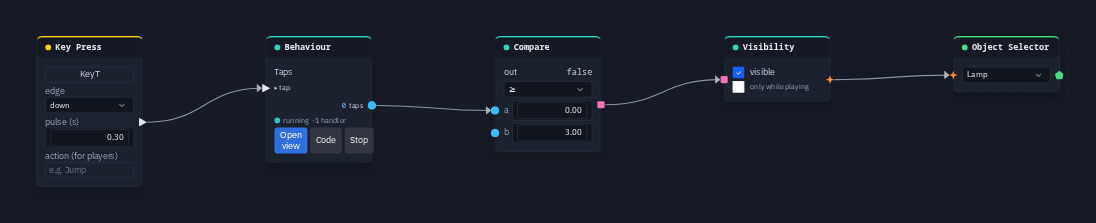
Three taps light a lamp:
-
Add a Behaviour node, press Code and replace the file with:
export default behaviour({
    name: 'Taps',
    state: { taps: 0 },
    inputs: ['tap'],
    outputs: ['taps'],
    on: {
        tap() {
            this.state.taps += 1;
        }
    }
});
Save with Ctrl+S: the card grows a ▸ tap input and a taps output. 2. Add a Key Press (capture T) and wire it → the Behaviour's tap. 3. Add a Compare (op
gte, b = 3) and wire taps → its a. 4. Wire Compare → a Visibility node's on, and Visibility → an Object Selector picking the lamp. 5. Press Play and tap T three times: the count shows on the card and the lamp appears for everyone.