Get Variable
Reads a named shared variable as a number — the read side of Set Variable, live on every player's screen.
Output: number (shown live on the card)
Parameters
| Parameter | Default | Options |
|---|---|---|
| name | score |
the variable to read — the same name the Set Variable writes |
A name nothing has written yet reads as 0.
What it reads
Get Variable reads the shared variables: the ones a Set Variable with scope shared writes,
and the shared count of the Collectibles module. They travel with the game state, so every
player — including one who joins later — reads the same number, and the read itself sends
nothing.
It does not read per-player numbers (Set Variable scope player); use
Player Variable for those. It does not read what Store Value
saved on the device either; that is Stored Value.
Practical example
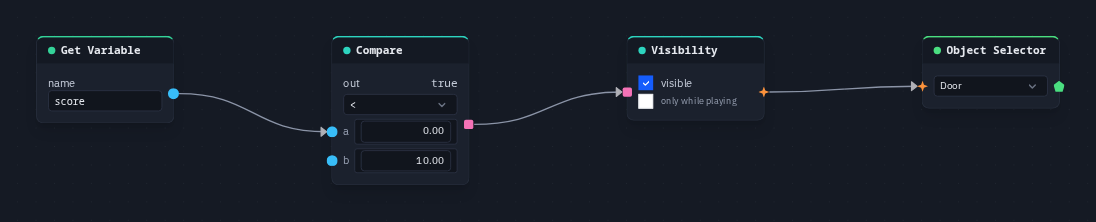
A door that disappears once the team has 10 points:
- Add a Get Variable (name
score). - Add a Compare (op
lt, b = 10); wire Get Variable → its a. - Add a Visibility node; wire Compare → its on.
- Add an Object Selector picking the
Door; wire Visibility → Object Selector. The door stays while the score is under 10 and vanishes for everyone when it reaches 10.
Tip
To show a variable on screen, select a HUD Text element and pick Actions ▸ Show a variable in the HUD editor: it wires a Get Variable into a HUD Text for you.