Share a Game
New in 1.57. Every way of sharing a game made here — a link, an embed on your own site, a pasted link that turns into a game, an invite to play together — opens the play view: a small player made only for playing. It loads the scene, the game's rules, HUD and touch controls, and none of the editor, so a shared game starts noticeably faster, most of all on a phone.
Start from Topple tower
Templates ▸ Topple tower is a tiny game set up for sharing: no modules or packs to download, so its play link starts fast on a phone, and nothing on top of the screen for the play view's buttons to cover. Change it, publish it, send the play link.
| You want… | Share | Who can open it |
|---|---|---|
| people to play your published game | the play link https://theprototype.app/p/‹id› |
anyone with the link (public and unlisted scenes) |
| the game on your own site or blog | the Embed snippet (an <iframe> of /e/‹id›) |
public scenes |
| the game to appear when you paste its link | the scene page link https://theprototype.app/s/‹id› in a site that reads oEmbed |
public scenes |
| friends to play with you, right now | the Play link from Invite | whoever you send it to, while the invite lasts |
The play link
Publish a scene (Menu ▸ Publish / Export ▸ Publish, see Publish & Export)
and you get its play link, https://theprototype.app/p/‹id›, with a QR code for a phone or a headset. The
community page's ▶ Play button and its 3D preview open the same play view. The first time, a note under the link
says what it opens and where the link for playing together is; it goes once you copy or open the link.
The play view shows a start card with ▶ Play (and Enter VR first in a headset's browser: on a headset the link waits for you to press it instead of starting flat), a fullscreen button, the Made with ThePrototype badge and two links into the full app:
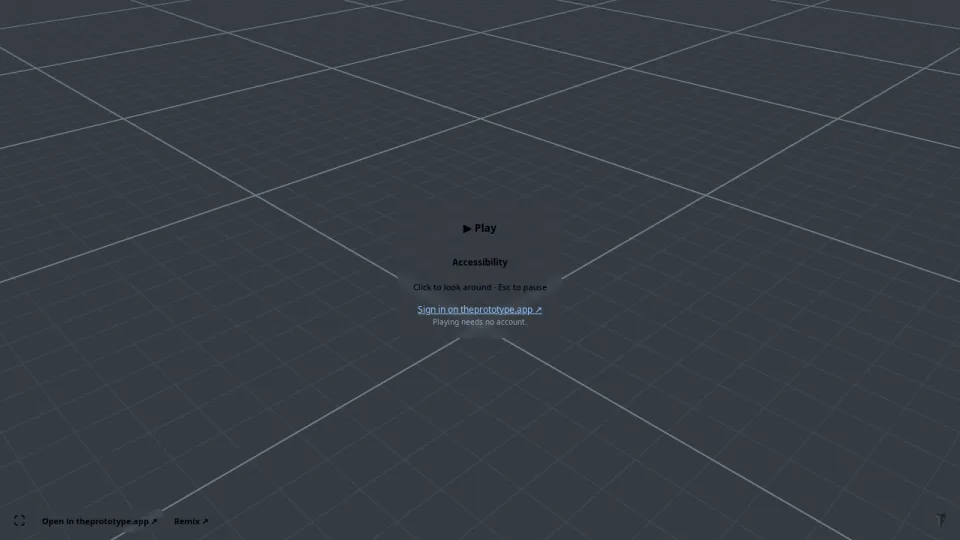
- Open in theprototype.app ↗ — the same scene in the editor, to look at how it is made.
- Remix — the same scene in the editor as your copy: change it, then Publish it as a remix (the original author is credited on its page).
Playing needs no account. Shared games run on a separate address, play.theprototype.app, where your sign-in, your
autosaves and your AI keys do not exist — whatever a shared scene does, it cannot reach them. So the start card does not
sign you in; it links to theprototype.app instead (Sign in on theprototype.app ↗). Likes work on the scene's page.
Embed it on your site
Embed on a public scene's page (or the Embed preset in Export)
copies an <iframe> of https://theprototype.app/e/‹id›. It is the same play view, sized by your frame; it asks for
fullscreen, gamepad, pointer lock and VR access, so all of them work inside the frame. Only public scenes embed.
Paste a link, get a game (oEmbed)
Paste a public scene's page link (https://theprototype.app/s/‹id›) into a site that reads oEmbed — Notion,
WordPress, Discourse, Ghost and the sites that use Iframely — and the game plays in place. Developers can call the
endpoint directly; it answers the same /e/‹id› frame:
https://theprototype.app/oembed?url=https://theprototype.app/s/‹id›&maxwidth=800&maxheight=600
Details (sizes, what is accepted) are in Community ▸ oEmbed.
Follow the game from your page
For site builders: the play view tells the page that frames it what it is doing, with postMessage:
window.addEventListener('message', (e) => {
  if (e.data?.type !== 'tp-play') return;
  // e.data.event: 'first-frame' | 'loaded' | 'playing' | 'stopped' | 'error'
  console.log(e.data.event, e.data.detail);
});
Inside the play view, window.tpPlay gives a script the same information: version (1), state (booting,
loading, ready, playing or error, mirrored on <html data-tp-play="…"> for CSS), ready and loaded
(promises), sceneId, openInEditorUrl(), remixUrl() and timings.
Play together from a link
You can invite people straight into the play view of the session you are in — they play with you, without seeing the editor:
- In the editor, open the invite sheet — the Invite button (person-plus) on the Connect pill, or Users ▸ New… — and pick the Person tab.
- Choose the Role, how long the invite lasts and how many people may use it, then Create invite link.
- Copy the Play link — opens straight into the game, no editor and send it.
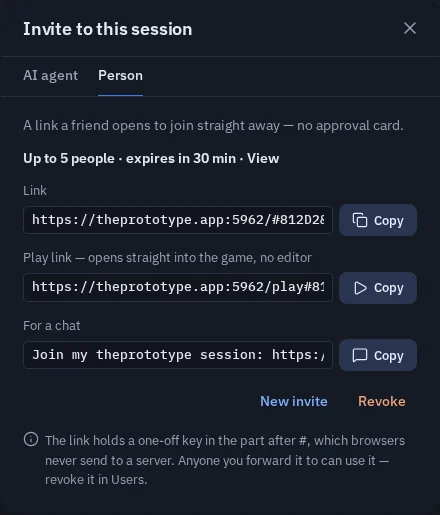
Everyone who opens it joins your session in the play view and gets the scene from you — it does not need to be
published. The ordinary Link above it still opens the full editor, for people who should build with you. A play
link of a published game can carry an invite too: https://theprototype.app/p/‹id›#… with the part after # from the
invite joins your session on that game's page.
The invite works like every invite: it is checked by your app, it can be revoked in Users, and the key in it
(after the #) is never sent to a server.
Limits
- Building tools — the Inspector, the node editor, the AI assistant, Settings — are not in the play view. Open in theprototype.app or Remix opens them.
- A self-hosted copy of the app has the same play view at
/play; the community links (/p/,/e/, oEmbed) belong to theprototype.app's community. - Old links keep working:
https://theprototype.app/?s=‹id›&play=1&embed=1still opens the full app with the editor hidden.