Set Game State
Switches the shared game state — menu, playing, paused or over — when a pulse arrives.
Every player follows the same state: it is the one switch a Start, Pause or Game Over button
writes to.
Output: none (an action)
Inputs
| Handle | Type | Meaning |
|---|---|---|
| trigger | event | each pulse makes the switch once — a HUD Button, an On Click, a Delay, All Players |
The trigger needs a pulse. A true/false value (a Compare) wired straight in does nothing; put an event node such as All Players between them.
Known problem in 1.42
The card does not draw its trigger socket yet, so this node cannot be wired by hand in the node editor. Until that is fixed, let the HUD editor build it: select a button and pick one of the game actions (see the tip at the end of this page) — the action adds a Set Game State already wired to the button.
Parameters
| Parameter | Default | Options |
|---|---|---|
| state | playing | menu, playing, paused, over |
| outcome | (empty) | a short word stored with the state, up to 40 characters — won, lost — meant for over |
| full reset | off | on: back to menu and the round clock to zero, whatever state says |
What each state does
- playing from
menuoroverstarts a new round: the round number goes up by one and the round clock (Game Time) starts again from 0. Frompausedit resumes the same round, and the clock carries on where it stopped. - paused stops physics, animations and the round clock for everybody. Flow logic and the HUD keep running, so a pause menu still works.
- over ends the round with the
outcometext. The clock is not zeroed. - menu goes back to the menu. Only full reset also zeroes the round clock, so a Game Time readout on the menu shows 0 instead of the last round's time. A reset keeps the round count and the variables.
HUD screens set to show while a state (see HUD Editor) and Game Start nodes react to the state by themselves; On Game State pulses when it changes.
In multiplayer
The pulse is shared, so every player's copy of the graph makes the same switch at the same moment, and the newest write wins. It does not matter who pressed the button. A player who joins later receives the current state, round, clock and outcome on arrival. A Set Game State node you add only acts on pulses that come after it was placed: an old click never starts a game.
The state is saved with the scene. Leaving Play on your own puts the game back on its menu; with other people in the session, the game resets once the last player has been out of Play for ten seconds.
Practical example
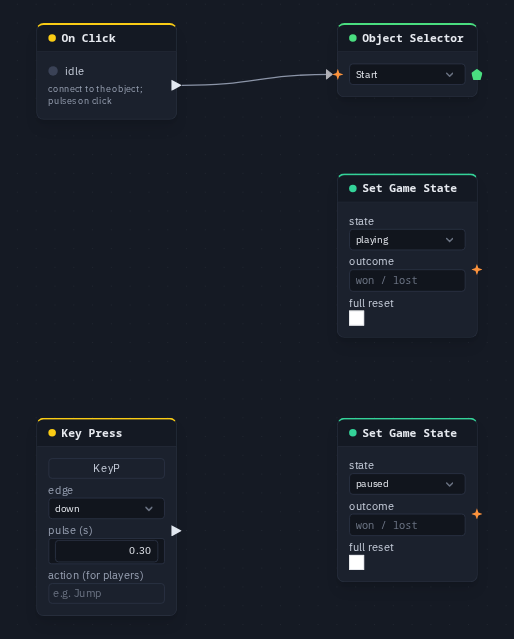
A start button and a pause key:
- Add an On Click and an Object Selector picking a
Startbox; wire On Click → Object Selector. - Add a Set Game State (state
playing); wire On Click → its trigger. - Add a Key Press (capture P) and a second Set Game State (state
paused); wire Key Press → its trigger. - Press Play and click the box: the round starts for everyone. P pauses it, and a click on the box resumes it.
Tip
The HUD editor builds these for you: select a button and pick Actions ▸ Start the game, Pause, Resume, End the game, Back to the menu or Reset the game.