Build with an AI agent
You can invite an AI agent — Claude Code, Claude Desktop, or any tool that speaks MCP — into your session and build with it. Hand it a link, it joins like any other peer, and you watch the scene grow live. Everything it does is replicated to everyone and undoable, exactly like a person's edits.
Talking to Claude in claude.ai or the Claude app?
Use the Claude connector instead: add it once, press Connect Claude in your tab, and build by chat or voice — no link to paste.
New in 1.48
Agents join from a link, see the scene through screenshots, and get the app's full tool set (objects, flow nodes, physics, and mesh generation through your provider).
For you, the person in the session
- Give the agent a way in.
- Plain link: copy your session link (the peer id in the Connect bar). The agent knocks, and you press Approve on the request card — it carries a robot badge. On theprototype.app with accounts, Approve may admit it view-only: a view-only agent cannot change anything (it is told so plainly). Give it Editor in Users ▸ role, or use an invite instead.
- Invite (recommended): Connect ▸ Request AI makes a single-use, short-lived link that joins in one step with the role you pick (Edit by default) and shows you the ready-made command to paste into your agent. See Invite people and agents.
- Tell the agent what to build, in its own chat: "Join my theprototype session and build a campfire with six rocks, a flickering light and a spinning sign."
- Watch and steer. Its changes appear as they happen. Undo (Ctrl+Z) takes back one of its tool calls at a time; edit alongside it — it notices your changes.
What an agent never does: move your camera, read anything outside the scene, or use API keys of its own inside the app. If it generates a 3D model (generate_mesh), that runs on your mesh provider (Settings ▸ AI ▸ Mesh generation) — you see who asked on the progress card and can cancel it there.
For the agent (setup)
claude mcp add theprototype -- npx -y @theprototype/agent mcp 'https://theprototype.app/#F0FD3'
Claude Desktop: add npx -y @theprototype/agent mcp <link> under mcpServers. Node 20 or
newer. The first run downloads a headless Chromium unless Chrome, Edge or Chromium is already
installed. The bridge opens the link in that browser — it is the app, at the app's own version
— joins, and turns the app's tools into MCP tools.
A good first exchange is three calls: status (am I in, can I edit?), the tool list, and one batched create_objects. Then screenshot to check the result.
What the agent gets
| tool / method | what it does |
|---|---|
| the app's tools | create_objects, update_objects, delete_objects, group_objects, create_flow_nodes, update_flow_nodes, set_physics, create_joints, control_simulation, behaviours where available, generate_mesh when the host has a provider — with their full JSON schemas |
status |
joined or waiting, its role and whether it can edit, who is connected, which scene it and the host are in (withHost), whether a scene is still arriving (loading), any code behaviour that is failing (behaviourErrors), whether it is paused because the host left (hostAway), which tools or modules are missing and why |
screenshot |
a clean picture (no gizmo, grid or helpers) from a temporary camera — iso, top, front, current, or focus on one object — without moving anyone's view |
wait_for_edit |
waits until someone else changes the scene |
describe_node_types |
what a flow node type takes and gives — input and output names with their types, params with defaults, one line on what it does — so edges are wired right the first time |
what_can_you_do |
a short, speakable summary of what the agent can do in this session (a viewer hears that it can look but not build) |
install_modules |
installs the modules the other peers run (games, tools) so the agent sees the same scene |
pending_offers / accept_offer |
answers questions the app asks (for example an admin-role offer) |
Rules a good agent follows
- Read the scene first and edit by uuid.
- Put a whole request into one
create_objectscall (one undo step). - Y is up, distances in metres, rotations in radians; the ground is y = 0.
- Motion is flow nodes: one behaviour node (spin, bounce, path patrol…) in an object's graph drives that object.
- Pin scenery with
set_physicsmode: "static"so Play does not collapse the scene. control_simulationruns on the host's machine, so physics plays at its real speed; an agent's own page never simulates.- Lights take their settings directly:
color,intensity,distance,angle,penumbra,aimand so on, oncreate_objectsandupdate_objects. A field that does not apply comes back in that object'serrors. - A wire in
create_flow_nodesmust name a socket the node really has: a wrongtoHandle(or a wrongfromHandleon a node with several outputs) is refused, and the error lists the node's real socket names. - Code behaviours (
create_behaviour) explain their own format with a working example. The checker refuses code that would silently do nothing: athis.member that does not exist (a behaviour drives effect nodes through its outputs; it does not move objects itself) or a per-frame hook such asonTick(repeat withthis.after). - Inside a group, positions are local to the group, the way
list_scenereports them (since 1.48.1). list_sceneshows a shape's sizes (a wall's thickness, a box's depth) and can be narrowed: names only, a name pattern, a type, or the objects near a point (since 1.48.1).- Never fight a person: a locked object is skipped — the reply names the object and who is editing it — and the agent
waits with
wait_for_edit.
What you see while it works
- The agent shows in the Connected panel with a robot and "AI" — no character, no voice, no cursor. A small AI camera marker shows where its last screenshot looked, and a presence marker — a bot icon with the agent's name — stands over the object it is editing, on desktop and in a headset alike. The presence marker fades while the agent is idle, hides in Play, and leaves with the agent. Settings ▸ Connection ▸ Show where AI agents look (on by default) switches both off.
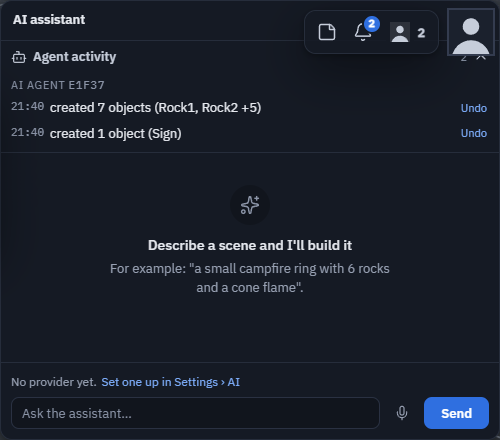
- The AI assistant window lists every step it takes under Agent activity — "Claude · created 12 objects (Campfire)" — on every peer, including people who join later. Click a line to select what it touched; editors can Undo that one step for everybody.
- It goes where you go. Save the scene under another name, or open another scene, and the agent follows you there on its own; it holds its edits while it travels, so nothing lands in the scene you left. Open a scene privately and it waits (it tells its user why) until you are back in a shared scene. An agent never takes over as host or decides a game's rules for the people playing, and nobody joins your session through it.
- If the host leaves, the agent carries on with the person who takes over. If everybody leaves, it pauses: it can still read the scene but builds nothing, and waits for its host (10 minutes by default). When the host is back, the agent asks to come in again — the ordinary approval card — and carries on.
- To stop it, revoke its invite or use Remove from session on its row (Users and moderation).
Security notes
- An invite's token lives in the URL hash, which browsers never send to any server. Link preview bots (Slack, Discord, Telegram) cannot use it: joining needs a full WebRTC client and your live approval check. The risk is a link forwarded on, which single use, expiry, the "used by" line and Revoke in Users limit.
- More in Invite people and agents ▸ Security notes.
- An agent is a peer with your session's normal permissions — nothing more. Its edits go through the same replicated paths as yours.
For developers: the in-page API
The bridge drives window.tpAgent, a supported, semver'd API that exists only when the URL
carries &agent (#F0FD3&agent) or localStorage.agentApi = '1'. Any driver that can evaluate
JavaScript in the page can use it: tools(), systemPrompt(), exec(name, args),
snapshot(), status(), waitForEdit(ms), screenshot(opts), pendingOffers(),
accept(id), leave(). The full contract is in the app repository's
AGENT-SESSIONS.md and
inlined in /llms-full.txt.
Versions. tpAgent.version is the contract (1.x): new methods and fields are minor versions, a removed or changed
one is a new major. The @theprototype/agent package follows the app release it shipped with and says so in its
status (contractNote) when the page speaks a different contract major — update it with
npx -y @theprototype/agent@latest.
For a light peer without a browser (objects only), see the Console Agent
(--engine=wire).