Modules
Modules plug playable content into the app — instruments, mini-games, generators, custom nodes and tools — and everything they do replicates to every connected peer.
The Modules manager
Open it from Menu ▸ Modules. Since 1.30 Install from file… sits in the header, the Core / User / Browse tabs show counts, a Filter modules field narrows whatever the tab lists (name, description, author, tags), and each module is one row — name, version, description, its actions, the download-as-example icon and its on/off switch.
Since 1.32 every row is laid out the same way at any width, a phone included: the name and description on the left, the controls on the right — on Core, the download icon and the switch; on User, Remove and the switch; on Browse, Install (or Retry). A module's own actions — Button & door's + Button, Pong's spawn / remove, Update — sit under its name and description. A description that is cut short ends in a chevron: tap the text to read all of it, tap again to fold it. The dev-URL row fits a phone's width too.
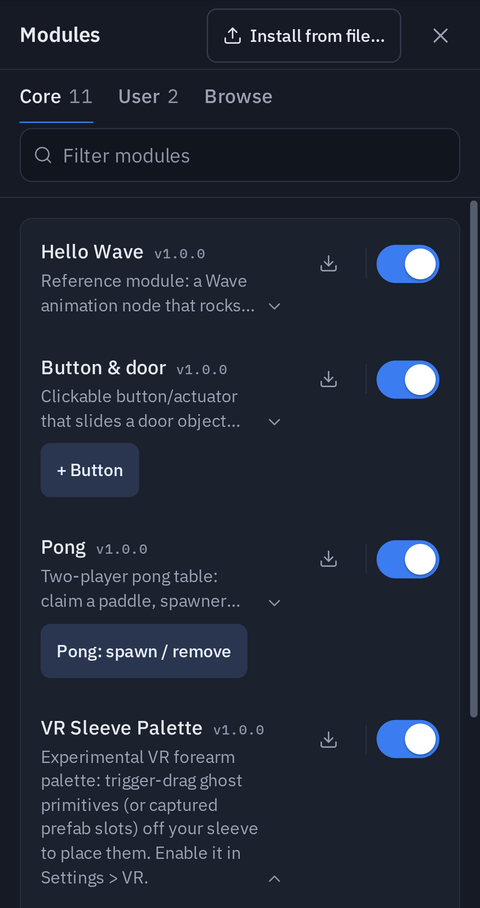
- Core modules ship with the app (hello, button, pong, VR sleeve). Toggle each on or off: both are live (since 1.20, disabling no longer needs a reload).
- The dungeon generator, piano, avatar controller, VR essentials and drivable car used to ship in the app; they now live in the Browse gallery, so install them there when you want them. Everyone in a session needs the same modules for shared behaviour to match — including anyone who joins later.
- ⬇ Download as example exports a core module as a zip — the best starting point for writing your own.
- Peers exchange module lists when they connect and show a toast if a module is missing or a different version on the other side. The session still works, but that module's behavior may differ — treat same modules everywhere as part of the session contract.
When you open another scene, the modules the last scene brought can be unloaded or kept — see Opening another scene, and modules.
What modules can add
- Flow nodes — new node groups in the palette, driving per-frame effects through the Object Selector like built-in nodes.
- Primitives — new
/createobject types, with spawn buttons on the module's manager card. - Click handlers — objects that react to desktop clicks and VR trigger presses (a piano key, a door button).
- Viewport content — scene content and generated worlds, plus menu buttons and VR radial-menu entries.
Installing user modules
The manager's Install zip / Install URL buttons load third-party modules:
- Zip — a package containing
manifest.json+module.js(plus optionalassets/,prefabs/,config.json). Keep zips under ~20 MB; they persist in your browser. - URL — a base URL serving the same layout (GitHub
treelinks are converted automatically; the host needs CORS). Update on the card re-fetches from the same URL. - Browse — a gallery of community modules from github.com/theprototype-app/modules, installed with one click. Installed entries dim; an Update button appears when the gallery lists a newer version. The same trust model applies — gallery modules run unsandboxed.
Installing from Browse keeps you on Browse, so you can install several in a row. Click Install on as many modules as you like — each installs on its own, none cancels another, and its card shows Installing… until it finishes. If one fails, its card says why (for example a download error) with Retry; Details shows the full message. The User tab's count grows (and pulses) to show where they went; opening it scrolls to the newest card and flashes it. Every module's buttons, its Dev URL row and Remove live on that card.
User modules install, update, disable and remove live — the manager genuinely unloads everything a module registered (menus, nodes, effects, handlers, timers, listeners) without a page reload, and so does switching a core module off.
An installed module older than the version the current app release shipped with is flagged: a toast names it with Update, and its card shows an Update row. See the stale-module warning.
Dev mode — live reload while you build
Every user-module card has a Dev URL row for module authors: point it at any
server that serves your module folder (manifest.json + module.js — npx serve,
a GitHub raw link, anything with CORS), then:
- Reload fetches fresh code, tears the old instance down and re-registers it — no page reload.
- Auto polls the URL (~2 s) and reloads whenever the served
module.jschanges. - A parse or registration error keeps the previous version running (you get a toast).
- Connected peers toast a module version mismatch while you iterate — expected: your dev copy genuinely differs from theirs.
Any static server with CORS will do:
cd my-module          # the folder holding manifest.json + module.js
npx serve -l 8099 --cors .
then install http://localhost:8099 from the field above. The full recipe,
including what survives a reload and the gotchas, is in the modules repo's
AUTHORING.md.
Scene objects your module created stay (they are replicated user content); the module's own scene-root viewport groups are rebuilt by the fresh code.
User modules must be self-contained: a single module.js with no import statements — three.js and packaged assets arrive through the API (api.THREE, api.assetUrl(path)). Custom Svelte node UIs are core-module-only; user modules get the generic parameter-driven node cards.
Trust model
Installing a module means running its code in your session, with your peer connections. There is no sandbox. Install only from sources you trust.
From the Browse gallery
A few of the gallery's modules, in Menu ▸ Modules ▸ Browse:
Drivable Car
A demo car you spawn from its card. Click its body in Interact (I) to claim it, then drive with W/S and A/D in Play while a simulation runs. Since version 1.3.0 it steers with its front wheels like a real car — each front wheel turns on a knuckle, about 31° each way — instead of tank-steering by spinning one side faster. On an app older than 1.27 it keeps the old tank steering.
Blocks
A performance showcase, new in 1.27 (it needs app 1.27). Blocks: drop 100 blocks, a button on the module's card, drops a hundred blocks that tumble and pile up on the ground and on whatever is in your scene — select an object first to drop them on it. All 100 are drawn in one draw call. Blocks: clear removes them for everyone.
Every player sees the same drop, but each computer simulates the pile itself, so the piles agree closely but not to the millimetre: the blocks are decoration, not game pieces.
Smart unwrap (xatlas)
New in 1.28. It adds Smart (xatlas) to the UV editor's Unwrap menu:
automatic seams, each piece flattened, and everything packed into one 0–1 atlas with no overlaps. It is built on
xatlas compiled to WebAssembly, and the .wasm ships inside the module's zip, so it
makes no network calls.
It runs on the main thread — about 1–1.5 s for a 10,000-triangle mesh. For module authors calling the backend, it takes
margin (the UV editor passes 0.02), resolution (the packing raster, 512 by default) and padding (in texels,
overriding margin); see registerUnwrapBackend.
xatlas (MIT, Jonathan Young) and xatlas-wasm are credited in the module's THIRD_PARTY_LICENSES.txt.
SDK — writing a module
A module is one default export with a register(api) call:
export default {
    id: 'mymodule',        // stable + unique; routes your messages
    name: 'My Module',
    version: '1.0.0',      // peers toast when versions differ
    description: 'One line shown on the manager card.',
    register(api) { /* wire everything here */ }
};
The one rule that matters: a module runs on every peer and there is no server, so whatever it does must end up identical on all clients — one of three ways:
- Deterministic from shared inputs — effects computed from node
data(already replicated) and the synced clock. Prefer this. - Broadcast events —
api.send({...})a small message for discrete happenings, apply it locally and inapi.onMessage; never re-broadcast from a receiver. - State sync —
api.registerStateSync({getState, applyState})hands your current state to late joiners automatically.
Seed all randomness (send the seed, not the result) and never accumulate in effects — compute from base and time.
The register(api) surface, in brief:
| Call | Purpose |
|---|---|
registerNodeGroup(group, components?) |
Add a palette group of flow nodes (defaults seed node data; params auto-generate controls) |
registerEffect(type, fn) |
Per-frame effect (object, base, data, time), active when the node is wired into an Object Selector |
registerNodeDefs(defs) |
Ship code-editable nodes: each {key, name, params, code} becomes a custom node users can open in the Node Designer and tweak (your edits win over module reloads). Pairs with object flows — dropped into an object's flow, the node drives that object with no Object Selector |
pointerRay() |
Where the user is pointing, as a world-space THREE.Raycaster — desktop mouse over the viewport or the VR pointer hand. Fresh instance per call; null before the first pointer event. The drag recipe: click to pick, follow pointerRay() in a frame task, click to drop |
registerPrimitive(name, builder, opts) |
A replicated /create primitive + manager spawn button |
registerClickHandler(fn) |
Intercept desktop clicks / VR triggers on scene meshes |
registerInteractiveGroup(name) |
Make your own scene-root group clickable |
registerFrameTask(fn) |
Run every frame with synced time |
registerMenu(label, fn) / registerVRMenuEntry({...}) |
Buttons on the manager card / sectors in the VR radial menu |
haptic(intensity, ms, hand?) |
Buzz the VR controllers (both, or 'left'/'right'); no-op on desktop |
isVR() / vrHand(hand) |
In a VR session? / one hand's world pose + trigger/gripped state (null when untracked) |
fireObjectClick(uuid) |
Pulse On Click flow nodes targeting an object — lets user graphs react to your module's events (replicated) |
possess(uuid, opts) / possessModes |
Drive an object (tank controls + follow camera). possessModes lists this build's camera modes — feature-detect 'first' (first-person eye camera with optional pointer-lock mouse look) |
create(cmd, {at}) / moveObject(uuid, to) |
Build in the shared scene: the replicated /create (returns the new uuids) and the editor's replicated move |
physics.set(uuid, patch) / physics.createJoint(...) / physics.running() |
Replicated physics parameters, joints, and "is a simulation running" |
isPlaying() / peerIds() |
Play mode active / the connected peer roster |
flyTo(pos, lookAt) / playSound() / followCam(uuid) |
Local camera moves, spatial chimes and a chase camera (never replicated) |
send(msg) / onMessage(fn) |
Namespaced peer messages |
registerStateSync({getState, applyState}) |
Late-joiner catch-up |
scene(), objectsGroup(), peerId(), toast(), now(), THREE, assetUrl(path), sceneAssets() |
Utilities |
Content added to objectsGroup() joins the shared scene (synced, listed, editable by anyone). Derived content (a generated level) belongs in your own scene-root group, rebuilt from module state.
Writing your own? Start with the Module SDK guide (the register(api) reference, replication rules, testing checklist) and the package layout for zip/URL installs. The in-repo MODULES.md additionally walks through the hello and button core modules.