Main graph & node properties
A scene's flow graph is now called Main. It is where a game's logic starts: what the game does, which code runs it and how the pieces are wired are all reachable from here. Every node on it lists its properties in one panel, a double-click on a node that has code opens that code, and values flow through any chain of nodes the same way on every screen.
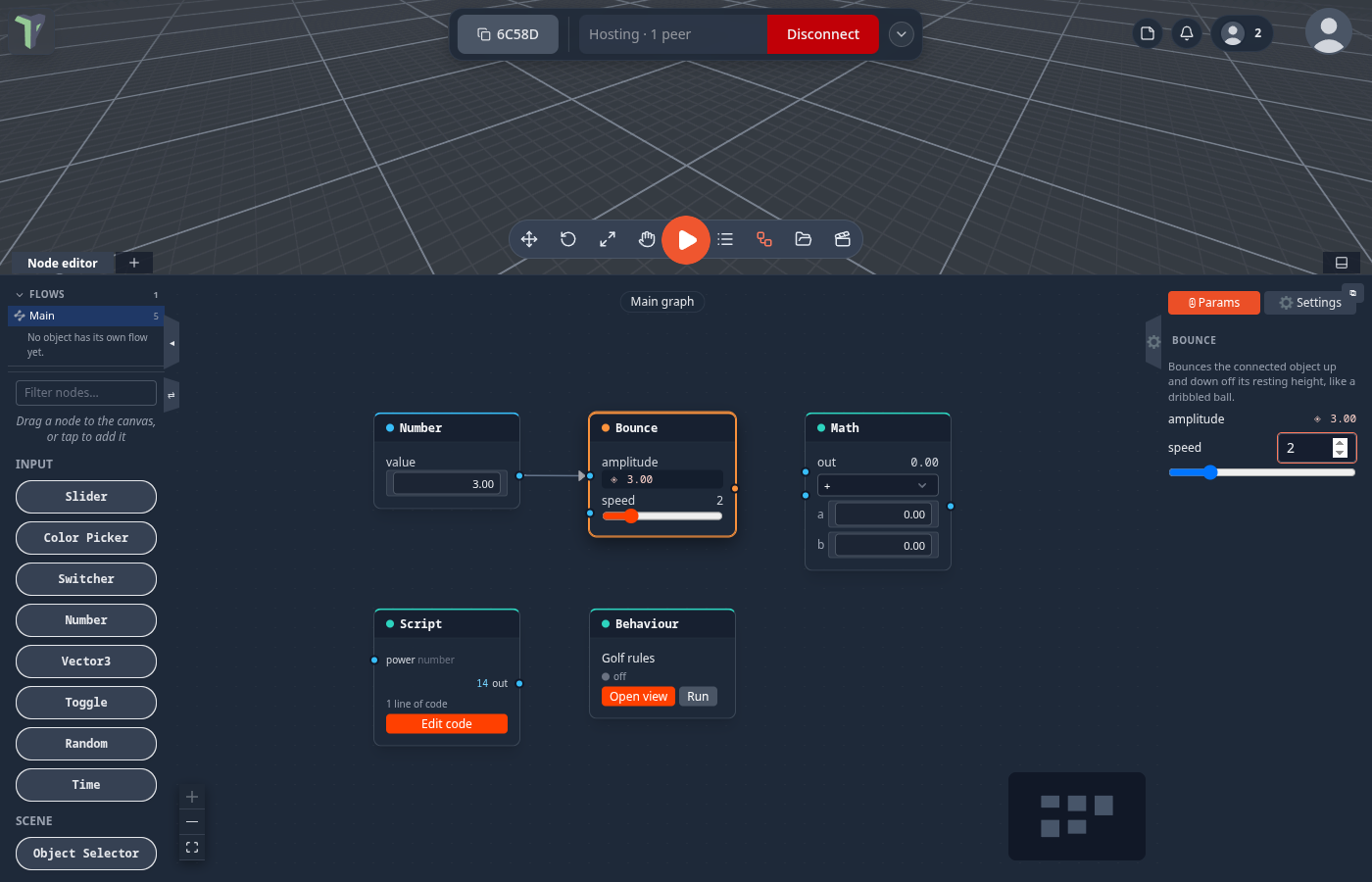
Where it is
- Node editor (N) ▸ Flows ▸ Main — the first row of the list. The chip at the top of the canvas says Main graph. It is the same scene-wide graph that was called Scene before 1.23.
- ⚙ on the right edge of the node editor opens the side panel; its ⓘ Params tab shows the selected node's properties.
- Double-click a node, or right-click it ▸ Open code, to see its code.
The Main graph
Every game that ships rebuilt in 1.23 keeps its rules on Main — see Game rules on the Main graph.
When you open an older scene, the app adds what used to be hidden to Main, in one column on the left:
- a Code link node for each module the scene needs — double-click it to read the module's source;
- an Object flow link for each object that has a graph of its own.
Nothing about how the scene runs changes. A scene that already has these links is left alone.
Properties panel
Select any node and open the ⓘ Params tab. Every node lists its properties there — ranges, numbers, toggles, colours and choices — including:
- a Script node's input values: the value an input uses while nothing is wired into it;
- a Behaviour node's params: editing one rewrites that number in the code itself, as one undo step;
- a module's node options.
A property with a wire into it shows the live incoming value (◈) instead of a control: the wire wins. Each change is one undo step and reaches every player.
Open code
Double-click a node (or right-click ▸ Open code) to see the code behind it:
| Node | Opens |
|---|---|
| Script | its code in the code workspace |
| Behaviour | its file in the code workspace (Open view on the card still shows the live node view) |
| Custom node | the Node Designer |
| Player (a Character Controller) | its code in the code workspace, with the engine source beside it, read-only — see The Player's code (1.25) |
| a module's node, a kit node, a Code link | the module's own source, read-only |
A module's files run the same for everyone, so they cannot be edited where they are. You can still read them, select and copy from them. If the code workspace cannot show a module's file, the Module source window opens instead, with Save a copy to Explorer.
Make editable copy
A Script or Behaviour node that a module ships bound to one of its own files says a module's code — read-only, with
Make editable copy. The code is copied into a new Explorer script (<name> (copy).js) and the node now uses your
copy, which you can edit freely. The game keeps running the same code until you change it.
Value wires
Values flow through any chain of nodes once per frame — a Slider into a Math node into another node's parameter — the same on every player's screen. A loop of wires is cut safely instead of freezing the graph.
Three nodes that used to read nothing when wired into a number input now give a value:
| Node | Reads as |
|---|---|
| HUD Button | 1 for a moment after the button is pressed, otherwise 0 (like On Click) |
| On Game State | 1 for a moment after the game enters that state, otherwise 0 |
| HUD Timer | the seconds left on the timer |
The Math node gains powers, sine and cosine, absolute value, rounding, clamping and negation for shaping a value between a slider and a parameter.
Scripts: sockets follow the code
In a Script with typed sockets, start reading inputs.speed or return { hit: … } and the node grows
that socket (as a number) when you save the code. Sockets are never removed for you, because a wire may hang on one;
remove them yourself in the code workspace. Scripts also get an api object to look at
the world, read keys and spawn objects.
Limits
- Main is the scene's graph, named; it is not a separate document. Groups and notes on it are only views.
- A module's source is read-only. Make editable copy is for Script and Behaviour nodes bound to a module's file.
api.keys()is this device's input, andapi.spawn()acts only on the room's host — see Script.