Sequence
Fires its four outputs one after another from a single trigger — a step-by-step timeline: "light 1, then light 2 half a second later, then the door".
Outputs:
| Handle | Type | Fires |
|---|---|---|
| step1 | event | wait 1 seconds after the trigger |
| step2 | event | wait 1 + wait 2 seconds after the trigger |
| step3 | event | wait 1 + wait 2 + wait 3 seconds after the trigger |
| step4 | event | wait 1 + wait 2 + wait 3 + wait 4 seconds after the trigger |
Inputs
| Handle | Type | Meaning |
|---|---|---|
| trigger | event | starts the sequence |
Parameters
| Parameter | Default | Options |
|---|---|---|
| wait (step 1) | 0 | seconds before step 1 — 0 fires it at once |
| wait (step 2) | 0.5 | seconds between step 1 and step 2 |
| wait (step 3) | 0.5 | seconds between step 2 and step 3 |
| wait (step 4) | 0.5 | seconds between step 3 and step 4 |
| pulse | 0.3 | how long each step's pulse lasts, in seconds (in the ⓘ Params tab, not on the card) |
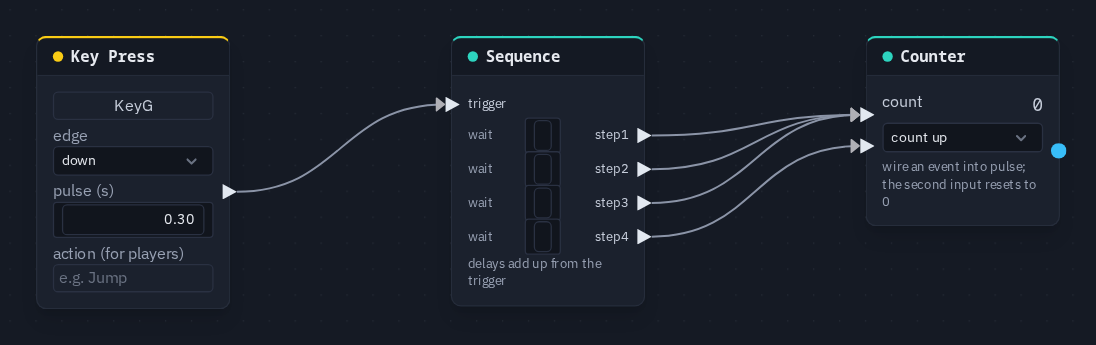
Each row on the card reads wait N … stepK: drag the number to change it. A step's name lights up (●) while it pulses.
How it behaves
- The waits add up. Each one is the gap since the step before it, not a time from the start — so with the defaults the steps fire at 0, 0.5, 1 and 1.5 seconds.
- One trigger runs all four steps. It does not advance one step per pulse; leave a step unwired if you need fewer.
- A new trigger starts over. Steps that had not fired yet from the previous trigger are dropped, and the sequence runs again from step 1.
- Same moment for everyone. Every step's moment is worked out from the one shared trigger time on the shared clock, the way a Delay is, so every player sees each step at the same moment and nothing extra is sent. A player who joins mid-sequence sees the remaining steps fire; steps that already happened before they joined do not fire again.
Practical example
Count one, two, three — and back to zero:
- Add a Key Press (capture G) and a Sequence; wire Key Press → Sequence's trigger.
- On the Sequence, set the waits to 0, 1, 1, 1.
- Add a Counter. Wire step1, step2 and step3 into the Counter's pulse, and step4 into its reset.
- Press Play and tap G: the Counter reads 1, 2, 3 a second apart, then 0.
Tip
Steps are ordinary pulses, so each one can drive anything an event drives — a Latch set, a Spawn, a sound, another Sequence for more than four steps.