HUD Bar
Drives a HUD bar element's fill from a number — health, fuel, progress.
Output: none (it writes into its element)
Inputs
| Handle | Type | Meaning |
|---|---|---|
| value | number | how full the bar is, between min and max |
| min | number | the empty end — wired, it replaces the card's min |
| max | number | the full end — wired, it replaces the card's max |
Parameters
| Parameter | Default | Options |
|---|---|---|
| element | (none) | the bar to drive — see below |
| min | 0 | −1000 to 1000 |
| max | 100 | −1000 to 1000 |
| format | (empty) | an optional label drawn on the bar; {v} is replaced by the value, so {v} HP reads 75 HP |
The fill is (value − min) / (max − min), kept between empty and full. The node's min and max replace the ones set on the element in the HUD editor, which are only the preview. A bar with show % turned on in the HUD editor shows the percentage instead of the label.
Picking the element
The bar itself is made, placed and styled in the HUD editor. On the card, element opens the scene HUD's elements grouped by screen; the pipette button lets you click the element on the HUD editor's stage instead, and Enter id manually... takes a typed id. A name that matches no element shows amber.
It drives more than the plain Bar:
| Element | What the value does |
|---|---|
| Bar | the fill, horizontal or vertical |
| Radial progress | how far the ring is filled — the same min / max maths |
| Icon row | how many icons are filled (the element's own max sets how many there are) |
| Hotbar | which slot is selected, counting from 0 |
Selecting one of these in the HUD editor and choosing an Actions ▸ Show ... entry builds a HUD Bar already pointing at it. Like the other HUD nodes it updates the screen about ten times a second, and every player sees the same fill when the value comes from shared state.
Practical example
A bar you can drag:
- In the HUD editor, add a Bar element.
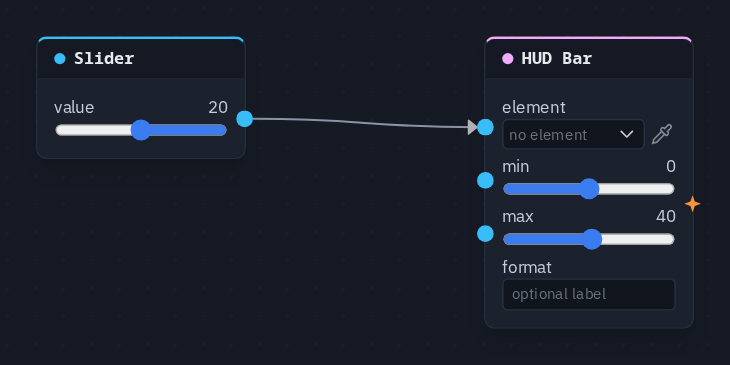
- Add a Slider node (value 20, Min 0, Max 40) and a HUD Bar picking the bar.
- Wire Slider → HUD Bar's value, and set the HUD Bar's min to 0 and max to 40.
- Drag the slider: the bar fills and empties with it.
Tip
For a health bar, keep the health in a variable and wire a Get Variable into value, with max set to the starting health — the bar then empties as the variable goes down.