Invite people and agents
An invite link lets someone into your session without an approval card: a friend you send it to, or an AI agent you paste it into. You decide what it allows — View or Edit, how long it lasts and how many may use it — and you can see who used it and take it back.
New in 1.48
Invite links for people and for AI agents, one sheet with two tabs.
A plain session link (your peer id, with no invite) works as before: whoever opens it knocks, and you get the approval card. See Inviting someone.
Make an invite
Connect bar ▸ the robot button (Request AI) opens the invite sheet. It has two tabs over one kind of link:
| tab | made for | role preselected |
|---|---|---|
| AI agent | Claude Code, Claude Desktop or any MCP client — see Build with an AI agent | Edit |
| Person | a friend, a colleague, your other device | View |
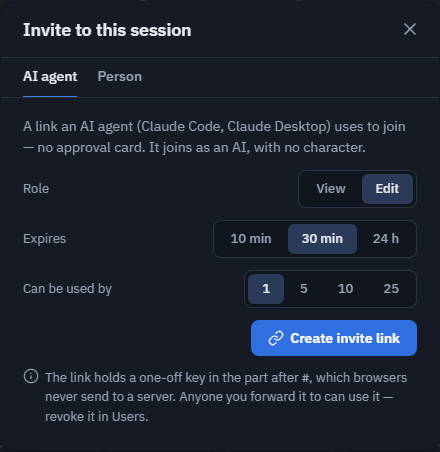
- Pick the settings:
- Role — View or Edit. On theprototype.app (accounts and roles) the person or agent joins with exactly this role, with no approval. In the open-source build everyone edits, so the choice is hidden.
- Expires — 10 min / 30 min / 24 h.
- Can be used by — 1 person (the default) / 5 / 10 / 25. Each use is listed in Users.
- Press Create invite link, then copy one of three ways to hand it over:
- the link —
https://theprototype.app/#A1B2C&agent&invite=…; - the MCP command (AI agent tab) —
claude mcp add theprototype -- npx -y @theprototype/agent mcp '<link>'; - a sentence for any chat — "Join my theprototype session and build with me: ‹link›".
- the link —
Whoever opens the link joins straight away, with the role the link carries. The sheet and Users then say who used it — "Used by Claude (E6F54)".
Who can make invites: whoever can approve joins — admins on theprototype.app, anyone in the open-source build.
See and revoke invites
The Connected panel (the people button) lists every invite that can still be used, with its role, expiry and uses, and who used it. Revoke stops one link at once; Revoke all stops every one. On theprototype.app the people an invite let in also lose the Edit it gave them. Removing someone who came by an invite uses that invite up — see Users and moderation.
AI agents and automatic joining
An AI agent that knocks with a plain link gets the approval card (with a robot on it), even when your room lets guests join automatically — unless you turn on Settings ▸ Connection ▸ Let AI agents join as guests (off by default). An invite link always lets it in. See Public rooms.
"AI agent" is what the joining app says about itself. It decides what you see — the robot, the card — never what it may do: an agent that hides it is just a guest, view-only like any other.
Security notes
- The key never reaches a server. It lives in the part of the link after
#, which browsers never send to any server, and the app removes it from the address bar and history the moment it reads it. - Only your app checks it. The joiner sends a proof made for both peer ids; your device — the one that holds the key — verifies it. A proof copied off the signaling server is useless to anybody else.
- Link previews cannot use it. Slack, Discord or Telegram preview bots would need a full WebRTC client and your live check to join.
- The real risk is a link forwarded on. Single use, a short expiry, the "used by" line, Revoke and View-by-default for people are what limit it.
- No valid proof means no automatic entry, ever: a wrong, reused, expired or revoked invite lands on the normal approval card, saying why.
A room code stays the long-lived key for a group; invites are per person and short-lived.
Limits
- An invite belongs to the device and the session id that made it: a reload keeps it, a new session id does not.
- In the open-source build there are no roles: an invite simply admits, and everyone edits.