Decals
New in 1.75. A decal is an image projected onto the surface under it: a sign on a wall, an arrow on the floor, dirt, a crack, a logo. It wraps the surface (round a curved pillar, over the steps of a stair) and moves with the object it sits on.
Put one on a surface
- Right-click the surface where it should go and choose Add decal here. A dashed square shows where it is.
- In Properties ▸ Decal, pick the Image: import a picture, or drag one from the Library. The Decals Starter pack (Explorer ▸ Packs, right-click ▸ Install pack) has 12 free (CC0) ones: arrows, chevrons, a turn arrow, warning and no-entry signs, hazard stripes, a footprint, a dirt splat, a mud smear, two kinds of cracks and a scorch mark.
- Move, turn and scale it with the gizmo like any object. It re-wraps the surface when you let go.
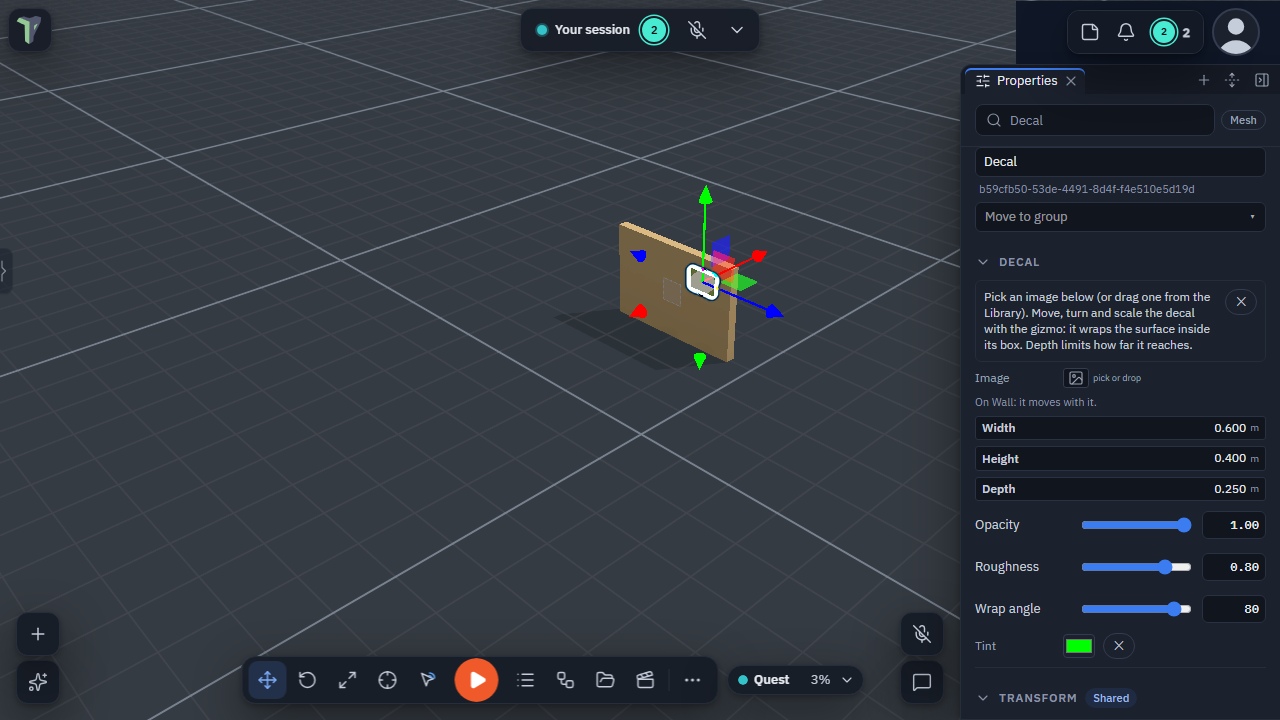
Settings (Properties ▸ Decal)
| Setting | What it does |
|---|---|
| Image | The picture projected. With none, a dashed square marks the decal. |
| Width, Height | The size of the decal (the same as its scale X and Y). |
| Depth | How far into and out of the surface it reaches (scale Z). Keep it small so it does not reach faces behind. |
| Opacity | How solid it looks. |
| Roughness | Shiny (0) to matte (1). |
| Wrap angle | Faces turned further than this from the decal are not covered, so it does not smear round corners. |
| Tint | Multiplies the image's colours; white shows it as it is. |
Undo, redo, saving, sharing with people in the session, Photo mode, baked light and the Cinematic view all work with decals.
Marks while playing: Stamp Decal
The Stamp Decal flow node (Scene group) presses a mark onto a surface while the game runs: a footprint, a scorch, a paint splat. Wire an On Impact into its trigger and it stamps where that object touched; wire a Decal object into look to copy its image, tint and opacity.
- size, depth: the mark's size (when no look is wired).
- seconds: how long a mark lasts (0 = for the whole run); it fades in its last second.
- most at once: up to 64; past that the oldest mark goes.
Marks are not saved and not undone; they all go when the run stops. Everyone in the session sees the same marks.
For agents
create_objects takes {kind: "decal", on: "<object uuid>", normal: [x, y, z]} (aimed at that object from that
side), or a point on its surface; plus image (a Library hash or file name), size, depth, opacity and
tint. See Build with an AI agent.
Limits
- Not on animated characters (skinned meshes) or on scattered copies: you get a message saying so.
- A very detailed object (more than 400,000 triangles) cannot take a decal.
- Not on a Gaussian splat: a scan has no surface to project onto.
- A decal is not a mesh of its own: Paint and Simplify refuse it (paint or simplify the object under it), and a 3D print or AR export leaves it out.
See also
- UV & Textures and Paint on meshes: paint into the object's own texture instead.
- Packs: installing a pack such as Decals Starter.