Node Graph Debugger
New in 1.39. The debugger lets you watch your flow graphs while you play: pause the game when an event reaches a node, step through what happens event by event, read the value on every wire into and out of a node, and keep an eye on variables in a watch list.
It is yours alone. The other players in the session keep playing, and nothing you set in the debugger is saved into the scene or sent to anyone.
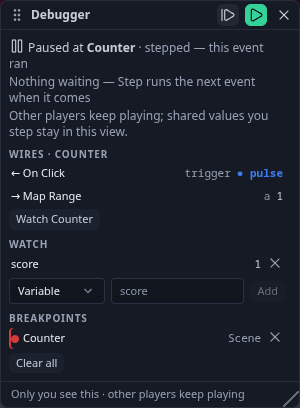
Breakpoints
In the node editor, right-click a node ▸ Breakpoint (pause Play here), or select nodes and press F9. A red dot marks the node. Remove it the same way.
Breakpoints pause on events. A pure value node (Math, Number) never pauses — watch it instead; the panel says so.
The Debugger panel
Open it with the bug button in the node editor's top bar. It also opens by itself when a breakpoint pauses Play. On a phone it is a bottom sheet.
- Set a breakpoint on the node you want to watch — an On Click, a Counter, a Set Variable.
- Press Play. The game runs normally until an event reaches that node. Then your view of the game pauses just before the node runs, the pointer is freed, and the panel says Paused at ‹node›.
- Step (F10) runs the next event: first the one that just paused you, then each event as it arrives — a click, a key, another player's action, a Delay finishing. With nothing waiting, Step runs the next event the moment it comes.
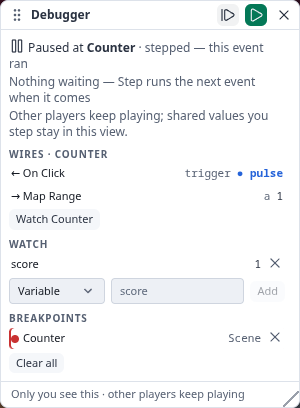
- Wires lists the node's inputs (←) and outputs (→) with their current values: numbers, on/off, vectors, object names. An event wire shows ● pulse when it fires, or how long ago it did. Click a neighbour to walk the graph.
- Watch a variable — a Set / Get Variable name, or My variable for a per-player one — or press Watch ‹node› to follow any node's output.
- Resume (F8) rejoins the live game. Pause (F8 while running) pauses at any moment, without a breakpoint. Leaving Play always resumes.
The debugger works in Play (and Test play). In the editor it only lists your breakpoints and watches.
| Key | Does |
|---|---|
| F9 | Breakpoint on / off for the selected nodes |
| F10 | Step: run the next event |
| F8 | Resume, or pause while running |
What "local" means
While you are paused, your view is frozen and events queue up for you; the session does not stop.
- Physics, spawns and behaviour reactions keep running for the other players.
- With other players connected, the values every player writes together (Set Game State, a shared Set Variable) stay in your paused view. Their games already made the same write, so nothing is counted twice when you resume.
Limits
Breakpoints are off in VR — on a headset the game just keeps running. Module code keeps running while you are paused.
Several HUD Buttons, one module input
Also in 1.39: several HUD Buttons can be wired into one module input (a Match Button's press, a Realms Button's press) — any of them presses it. A HUD Button wires straight into a module input; the Delay "bridge" older templates used is no longer needed, and the Football and Dungeon Realms templates are simpler for it.