Camera Follow
Makes your view follow an object from behind and above, as a third-person or chase view. Something else moves the object, and the camera just keeps up.
Output: effect (optionally wire into an Object Selector to pick the object)
Inputs
| Handle | Type | Meaning |
|---|---|---|
| trigger | event | start following the target |
| stop | event | let go |
| target | object | the object to follow, from an Object Selector |
The object is found in this order: the target input, then an Object Selector the node's output is wired into, then the owner of the object flow the node sits in.
Parameters
None. The framing is fixed: the view sits about 4.5 m behind the object and 2.2 m above it, turns with the object's facing, eases after it and keeps looking at it. This is the same chase view Possess Object uses.
How it behaves
- It moves your view only. The trigger is shared, so every player's copy reacts to it and each player's view follows on their own screen. Nothing else is sent.
- It doesn't take the controls and doesn't move the object. Use it when something else moves the object: physics, an animation, a path, another player.
- While it follows, dragging to orbit the view is switched off. On stop, orbiting comes back, centred on where the object ended up.
- A new trigger for another object switches to that one. Following stops if the object is deleted or when you enter VR.
- A pulse that happened before the node was added doesn't start it.
Practical example
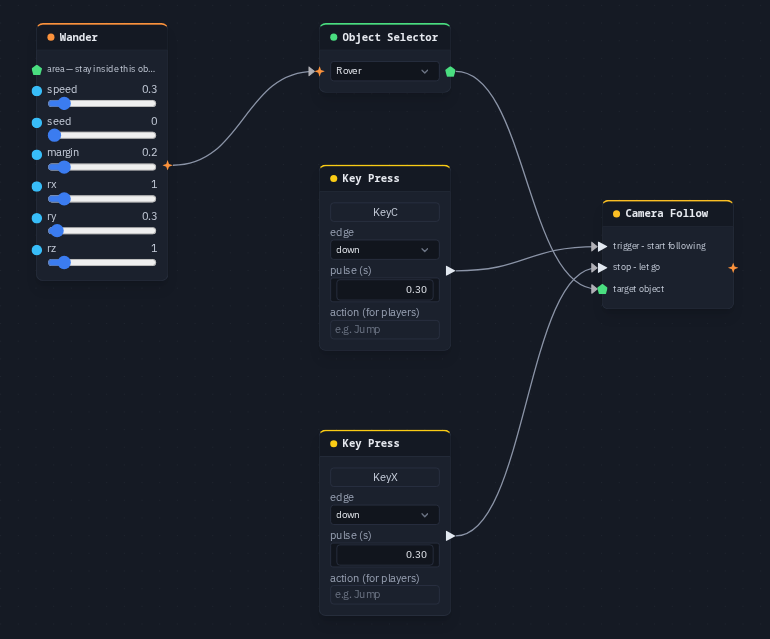
Follow a wandering box with C and stop with X:
- Create a box and name it Rover.
- Add a Wander and an Object Selector that picks Rover. Wire Wander → Object Selector so the box drifts around.
- Add a Camera Follow and wire the same Object Selector into its target.
- Add a Key Press on C into trigger and a Key Press on X into stop.
- Press C: the view swings in behind the rover and follows it. Press X to let go.
Tip
Camera Follow moves the player's own view. To move a camera object (a chase camera you can cut to, with an offset and damping you choose), use Camera Rig.