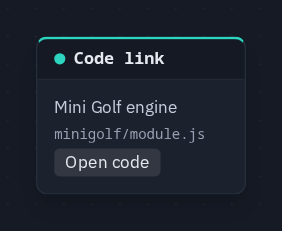
Code link
Points at the module or kit file whose code runs part of this game — double-click (or Open code) to read it. It does nothing at runtime; it is how the Main graph shows where every rule lives.
Output: none — it has no sockets, no value and no effect
Where you meet it
On a game's Main graph. Some of a game's logic lives in code rather than in nodes — a module's engine, a game-kit piece — and a Code link is the signpost to it, so nothing that runs the game is hidden from the graph.
- Older scenes: when you open a scene saved before the Main graph existed, the app adds one Code link per module the scene needs, in a column on the left of Main, titled ‹module› — rules in module code. Nothing about how the scene runs changes. See The Main graph.
- The shipped games use one to open their engine — see Game rules on the Main graph.
- Your own: add one from the palette's Logic group to say where a rule lives.
The card
The card shows the title, then module/file in small type, and an Open code button. Open code, a
double-click, or right-click ▸ Open code opens the file in the code workspace,
read-only — a module's code runs the same for everyone, so it cannot be edited where it is (see
Module code).
Parameters
Edited in the node editor's ⓘ Params tab.
| Parameter | Default | Options |
|---|---|---|
| title | (empty) | what this code does, up to 80 characters |
| module | (empty) | the module's id, e.g. minigolf (or kit for a game-kit file) |
| file | (empty) | the file inside it, e.g. module.js (for the kit, a piece such as round.js); empty opens the module's main file |
Practical example
A link to Mini Golf's engine:
- On the Main graph, add a Code link from the Logic group.
- In ⓘ Params, set title Mini Golf engine, module
minigolf, filemodule.js. - Double-click the card:
module.jsopens read-only in the code workspace.